Showing posts with label T4. Show all posts

Monday, May 24, 2021

Oracle SPARC T4-4 - USB Boot & Install

[SPARC T4-4 Chassis Image, Courtesy Oracle]

Oracle SPARC T4-4 - USB Boot & Install

Abstract

UNIX Systems Manufacturers originated their markets as workstations, during a time when they used 32 bit systems and the rest of the PC market was concentrating on 8 and 16 bit systems, and some CPU vendors like Intel use segmentation to keep their 16 bit software alive while struggling to move to 32 bit architectures. Some of the original servers were stacked workstations on a rack in a cabinet. The former high-powered video cards were merely ignored, as remote management needed command line interfaces. Engineering quickly determined that console access needed to be built into a new class of systems: rack mounted servers. These early servers offered boot functionality from Network and Disk. One such boot capability was from USB Disk.This capability was later carried onto other chassis that Oracle would manufacture, such as the SPARC T4-4.

Creating a USB Boot Stick from Solaris

The USB port can be used to create a Solaris 11.4 USB Boot Stick from Solaris, after inserting a SanDisk USB stick into the front port next to the DVD Drive:

T5120/root# echo | format -e | grep -i SanDisk
       4. c7t0d0 <SanDisk'-Cruzer Fit-1.00 cyl 1945 alt 0 hd 255 sec 63>
       5. c8t0d0 <SanDisk'-Cruzer Fit-1.00 cyl 1945 alt 0 hd 255 sec 63>

T5120/root# ls -al *usb
-rw-r--r--   1 dh127087 staff    1217341440 May  3 19:38 sol-11_4-text-sparc.usb

T5120/root# time dd bs=16k if=sol-11_4-text-sparc.usb of=/dev/rdsk/c7t0d0s2
74300+1 records in
74300+1 records out

real    8m57.25s
user    0m0.47s
sys     0m13.99s

T5120/root# echo "par\nprint\n" | format -e c7t0d0 | tail -14 | nawk '$NF!="0" && !/partition/'
Total disk cylinders available: 148 + 0 (reserved cylinders)

Part      Tag    Flag     Cylinders       Size            Blocks
  0 unassigned    wm       0 - 147        1.13GB    (148/0/0) 2377620
  2 unassigned    wm       0 - 147        1.13GB    (148/0/0) 2377620

T5120/root#

This USB stick can now be tested from, from OpenBoot Firmware

Oracle SPARC T4-4

The Oracle SPARC T4-4 is a server with a 4th generation OpenSPARC processor. The SPARC T4 processor was manufactured to the same process size as the SPARC T3 CPU processor, but the core was upgraded, so equivalent throughput could be reached with half as many cores, at the same processor speed. The T4-4 Chassis comes with a Lights Out Management (LOM) capability referred to as Integrated Lights Out Management (ILOM.) Most remote systems management work can be done from the LOM. The system, when looking at the front of the chassis: the T5120 has 2x USB ports next to the DVD drive on the right and 2x USB ports located in the back left corner.

Attaching to the ILOM

The ILOM can be attached to via TCP/IP, if previously configured, or over a serial port.

T5120/user$ ssh root@sun1234-ilom
Password:

Oracle(R) Integrated Lights Out Manager
Version 3.2.6.8 r128095
Copyright (c) 2018, Oracle and/or its affiliates. All rights reserved.
Hostname: ORACLESP-1207BDY075

->

Insert USB Boot

The USB boot flash stick should be inserted into a powered down chassis, to boot from firmware.

-> show /system power_state actual_power_consumption

  /System
    Properties:
        power_state = Off
        actual_power_consumption = 37 watts

Power Up Chassis

After the USB boot stick is inserted, the chassis should be powered up from the ILOM.

-> start /SYS
Are you sure you want to start /SYS (y/n)? y
Starting /SYS

After the chassis is powered on, once the power usage increases, attach to the console

-> show /system power_state actual_power_consumption

  /System
    Properties:
        power_state = On
        actual_power_consumption = 1384 watts


-> start /SP/console
Are you sure you want to start /SP/console (y/n)? y

Serial console started.  To stop, type #.

{0} ok

Note: If the chassis was recently started, the ability to access a prompt does not really occur until after the actual power consumption rises to an expected level.
Note: if the "ok" prompt does not appear, press [RETURN] or [ENTER] key

Select USB Port

When a SanDisk USB Flash Sticks are plugged into the USB ports located to the right of the DVD drive, they can be seen at the OpenFirmware prompt, and can be selected into a copy-paste buffer, for easy use.

{0} ok show-disks
a) /reboot-memory@0
b) /pci@700/pci@1/pci@0/pci@0/LSI,sas@0/disk
c) /pci@500/pci@1/pci@0/pci@1/pci@0/pci@3/SUNW,emlxs@0,1/fp@0,0/disk
d) /pci@500/pci@1/pci@0/pci@1/pci@0/pci@3/SUNW,emlxs@0/fp@0,0/disk
e) /pci@400/pci@2/pci@0/pci@1/pci@0/pci@3/SUNW,emlxs@0,1/fp@0,0/disk
f) /pci@400/pci@2/pci@0/pci@1/pci@0/pci@3/SUNW,emlxs@0/fp@0,0/disk
g) /pci@400/pci@1/pci@0/pci@8/pci@0/usb@0,2/hub@2/hub@3/storage@2/disk
h) /pci@400/pci@1/pci@0/pci@8/pci@0/usb@0,2/hub@2/storage@2/disk
i) /pci@400/pci@1/pci@0/pci@0/LSI,sas@0/disk
j) /iscsi-hba/disk
m) MORE SELECTIONS
q) NO SELECTION
Enter Selection, q to quit: h
/pci@400/pci@1/pci@0/pci@8/pci@0/usb@0,2/hub@2/storage@2/disk has been selected.
Type ^Y ( Control-Y ) to insert it in the command line.
e.g. ok nvalias mydev ^Y
         for creating devalias mydev for /pci@400/pci@1/pci@0/pci@8/pci@0/usb@0,2/hub@2/storage@2/disk
{0} ok

Note: the USB stick in position "h" (this lettered position may change as new USB sticks are plugged or unplugged) has it's device name copied into a "copy-paste" buffer by selecting "h"

Boot Solaris 11.4 from USB

After shutting down the OS, while on the console port, attempt to boot from 11.4, which is too new:

{0} ok boot ^Y
{0} ok boot /pci@400/pci@1/pci@0/pci@8/pci@0/usb@0,2/hub@2/storage@2/disk
Boot device: /pci@400/pci@1/pci@0/pci@8/pci@0/usb@0,2/hub@2/storage@2/disk  File and args:
/

Install Solaris 11.4

As the USB boot occurs, the Solaris 11.4 installer begins.

SunOS Release 5.11 Version 11.4.0.15.0 64-bit
Copyright (c) 1983, 2018, Oracle and/or its affiliates. All rights reserved.
Remounting root read/write
Probing for device nodes ...
Preparing image for use
Done mounting image
USB keyboard
 1. Arabic                        15. Korean
 2. Belgian                       16. Latin-American
 3. Brazilian                     17. Norwegian
 4. Canadian-Bilingual            18. Portuguese
 5. Canadian-French               19. Russian
 6. Danish                        20. Spanish
 7. Dutch                         21. Swedish
 8. Dvorak                        22. Swiss-French
 9. Finnish                       23. Swiss-German
10. French                        24. Traditional-Chinese
11. German                        25. TurkishQ
12. Italian                       26. UK-English
13. Japanese-type6                27. US-English
14. Japanese
To select the keyboard layout, enter a number [default 27]: 27

 1. Chinese - Simplified
 2. Chinese - Traditional
 3. English
 4. French
 5. German
 6. Italian
 7. Japanese
 8. Korean
 9. Portuguese - Brazil
10. Spanish
To select the language you wish to use, enter a number [default is 3]: 3

User selected: English
Configuring devices.
Hostname: solaris
 
 
Welcome to the Oracle Solaris installation menu

        1  Install Oracle Solaris
        2  Install Additional Drivers
        3  Shell
        4  Terminal type (currently xterm)
        5  Reboot

Please enter a number [1]: 1

                          Welcome to Oracle Solaris

   Thanks for choosing to install Oracle Solaris! This installer enables you
   to install the Oracle Solaris Operating System (OS) on SPARC or x86
   systems.

   The installation log will be at /system/volatile/install_log.

   How to navigate through this installer:
   - Use the function keys listed at the bottom of each screen to move from
     screen to screen and to perform other operations.
   - Use the up/down arrow keys to change the selection or to move between
     input fields.
   - If your keyboard does not have function keys, or they do not respond,
     press ESC; the legend at the bottom of the screen will change to show
     the ESC keys for navigation and other functions.

  F2_Continue  F6_Help  F9_Quit


                              Discovery Selection

   Select discovery method for disks

    Local Disks            Discover local disks

    iSCSI                  Discover iSCSI LUNs

 
F2_Continue  F3_Back  F6_Help  F9_Quit


                                     Disks

    Where should Oracle Solaris be installed?
    Minimum size: 4.1GB    Recommended minimum: 6.1GB

    Type     Size(GB) Boot  Device
    ----------------------------------------------------------------------
    scsi        279.4   +   SYS/MB/HDD4                  HITACHI
    scsi        279.4       SYS/MB/HDD0                  HITACHI
    usb           1.1       c2t0d0                       SanDisk'       <


    The following slices were found on the disk.

      Slice        #  Size(GB)             Slice        #  Size(GB)
      ------------------------             ------------------------
      rpool        0     279.4             Unused       5       0.0
      Unused       1       0.0             Unused       6       0.0
      Unused       3       0.0             Unused       7       0.0
      Unused       4       0.0             backup       2     279.4


F2_Continue  F3_Back  F6_Help  F9_Quit


                         Solaris Slices: 279.4GB scsi

   Oracle Solaris can be installed on the whole disk or a slice on the disk.

   The following slices were found on the disk.

     Slice        #  Size(GB)             Slice        #  Size(GB)
     ------------------------             ------------------------
     rpool        0     279.4             Unused       5       0.0
     Unused       1       0.0             Unused       6       0.0
     Unused       3       0.0             Unused       7       0.0
     Unused       4       0.0             backup       2     279.4

                              Use the whole disk
                            Use a slice on the disk

  F2_Continue  F3_Back  F6_Help  F9_Quit


                                System Identity

   Enter a name for this computer that identifies it on the network.
   It can contain letters, numbers, periods (.) and minus signs (-).  The
   name must start and end with an alphanumeric character and must contain
   at least one non-digit character.

   Computer Name: solaris

  F2_Continue  F3_Back  F6_Help  F9_Quit


                             Network Configuration

   Select a wired network connection to configure

     ^ net6 (e1000g4)
     | net7 (e1000g5)
     | net8 (e1000g6)
     | net9 (e1000g7)
     | net10 (e1000g8)
     | net11 (e1000g9)
     | net12 (e1000g10)
     | net13 (e1000g11)
     | net14 (e1000g0)
     | net15 (e1000g1)
     | net16 (nxge0)
     | net17 (nxge1)
     | net18 (nxge2)
     | net19 (nxge3)
     v net20 (nxge4)

  F2_Continue  F3_Back  F6_Help  F9_Quit


   Select how the network interface should be configured.

     DHCP              Allow DHCP to configure the interface

     Static            Configure the interface with a static IP address

  F2_Continue  F3_Back  F6_Help  F9_Quit


                              Time Zone: Regions

    Select the region that contains your time zone.

      Regions
      ----------------------------------------
      UTC/GMT
      Africa
      Americas
      Antarctica
      Asia
      Atlantic Ocean
      Australia
      Europe
      Indian Ocean
      Pacific Ocean

  F2_Continue  F3_Back  F6_Help  F9_Quit


                               Locale: Language

   Select the default language support and locale specific data format.
   These selections determine the language support, the default date and
   time, and other data formats.
   The language chosen automatically determines the available territories.

     Language
    ----------------------------------------
     No Default Language Support
     Chinese
     English
     French
     German
     Italian
     Japanese
     Korean
     Portuguese
     Spanish

  F2_Continue  F3_Back  F6_Help  F9_Quit


                               Locale: Territory

   Select the language territory

     Territory
    ----------------------------------------
     United States (en_US.ISO8859-1)
     United States (en_US.ISO8859-15)
     United States (en_US.ISO8859-15@euro)
     United States (en_US.UTF-8)

  F2_Continue  F3_Back  F6_Help  F9_Quit


                                 Date and Time

   Edit the date and time as necessary.
   Time shown is the system clock time in UTC and will be interpreted as
   such on installation.
   The time is in 24 hour format.

     Year:    2021 (YYYY)
     Month:     05 (1-12)
     Day:       22 (1-31)
     Hour:      05 (0-23)
     Minute:    46 (0-59)

  F2_Continue  F3_Back  F6_Help  F9_Quit


                                   Keyboard

   Select your keyboard.

   ^ German
   | Italian
   | Japanese-type6
   | Japanese
   | Korean
   | Latin-American
   | Norwegian
   | Portuguese
   | Russian
   | Spanish
   | Swedish
   | Swiss-French
   | Swiss-German
   | Traditional-Chinese
   | TurkishQ
   | UK-English
   - US-English

  F2_Continue  F3_Back  F6_Help  F9_Quit
 
 
                                     Users

    Define a root password for the system and user account for yourself.


    System Root Password (required)

     Root password:    solar1s
     Confirm password: solar1s

    Create a user account (optional)

     Your real name:
     Username:
     User password:
     Confirm password:

  F2_Continue  F3_Back  F6_Help  F9_Quit

 
                            Support - Registration

     Provide your My Oracle Support credentials to be informed of
     security issues, enable Oracle Auto Service Requests.

     See http://www.oracle.com/goto/solarisautoreg for details.

       Email: anonymous@oracle.com
              Easier for you if you use your My Oracle Support email
              address/username.

       Please enter your password if you wish to receive security
       updates via My Oracle Support.

              My Oracle Support password:

  F2_Continue  F3_Back  F6_Help  F9_Quit

 
                             Installation Summary

   Review the settings below before installing. Go back (F3) to make changes.

   - Software: Oracle Solaris 11.4 SPARC
   |
   | Root Pool Disk: 279.4GB scsi
   |
   | Computer name: solaris
   |
   | Network:
   | DHCP Configuration: net6/v4
   |
   | Time Zone: UTC
   | Locale:
   | Default Language: English
   | Language Support: English (United States)
   | Keyboard: US-English
   | No user account
   |
   v Support configuration:

  F2_Install  F3_Back  F6_Help  F9_Quit

 
                           Installing Oracle Solaris

               Preparing for Installation

              [                       (4%)                       ]

  F9_Quit

 
                             Installation Complete


   The installation of Oracle Solaris has completed successfully.

   Reboot to start the newly installed software or Quit if you wish to
   perform additional tasks before rebooting.

   The installation log is available at /system/volatile/install_log. After
   reboot it can be found at /var/log/install/install_log.


  F4_View Log  F7_Halt  F8_Reboot  F9_Quit
 

 May 22 06:22:23 solaris reboot: initiated by root
 

Welcome to the Oracle Solaris installation menu

        1  Install Oracle Solaris
        2  Install Additional Drivers
        3  Shell
        4  Terminal type (currently xterm)
        5  Reboot

Please enter a number [1]: syncing file systems... done
rebooting...
Resetting...
NOTICE: Entering OpenBoot.
NOTICE: Fetching Guest MD from HV.
NOTICE: Starting additional cpus.
NOTICE: Initializing LDC services.
NOTICE: Probing PCI devices.
NOTICE: Finished PCI probing.

SPARC T4-4, No Keyboard
Copyright (c) 1998, 2018, Oracle and/or its affiliates. All rights reserved.
OpenBoot 4.38.16, 1023.5000 GB memory available, Serial #99743488.
Ethernet address 0:21:28:f1:f7:0, Host ID: 85f1f700.
 
Boot device: /pci@400/pci@1/pci@0/pci@0/LSI,sas@0/disk@w5000cca0252bf86d,0:a  File and args:
/
SunOS Release 5.11 Version 11.4.0.15.0 64-bit
Copyright (c) 1983, 2018, Oracle and/or its affiliates. All rights reserved.
Loading smf(7) service descriptions: 238/238
Booting to milestone "svc:/milestone/config:default".
Configuring devices.
Loading smf(7) service descriptions: 2/2
Booting to milestone "all".
Hostname: solaris
May 22 06:35:06 solaris sendmail[1502]: My unqualified host name (solaris) unknown; sleeping for retry
May 22 06:35:06 solaris sendmail[1507]: My unqualified host name (solaris) unknown; sleeping for retry

solaris console login:

UnConfigure / Configure

Solaris 10, offered an option to perform a "sys-unconfig", to restore an OS back to factory settings. In Solaris 11, this has been replaced with another option called "sysconfig configure -s" or "sysconfig configure -s --destructive" to destroy the initial user home account to also be destroyed.

This option is good if moving a chassis to a different location.

Thursday, April 11, 2013

Solaris: Massive Internet Scalability


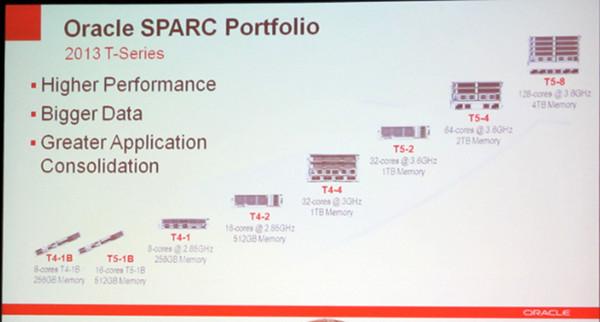
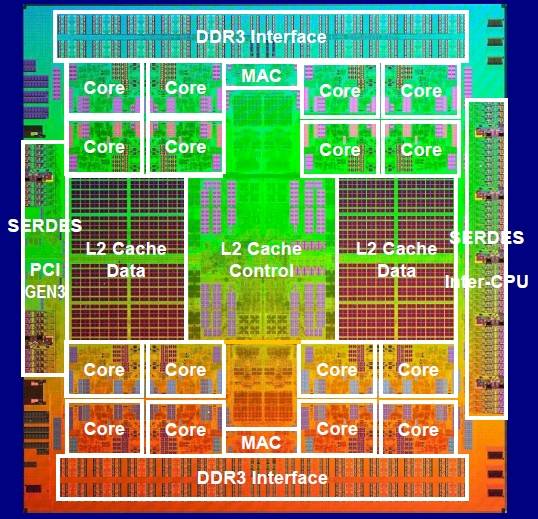
[SPARC processor, courtesy Oracle SPARC T5/M5 Kick-Off]
 Solaris: Massive Internet Scalability
Abstract:
Computing systems started with single processors. As computer requirements increased, multiple processors were lashed together, using technology called SMP (Symmetric Multi-Processing) to add more computing power into a single system, breaking up tasks into processes and threads, but the transition to multi-threaded computing was a long process. The lack of scalability for some problems produced MPP (Massively Parallel Processing) platforms, lashing systems together using special software to load-balance jobs to be processed. MPP platforms were very difficult to program general purpose applications, so massively Multi-Core and Multi-Threaded processors started to appear. Oracle recently released the SPARC T5 processor and systems - producing an SMP platform scalable with massive sockets, cores, and threads into a single chassis - leveraging existing multi-threaded computing software, reducing the need for MPP in real-world applications, while placing tremendous pressure upon the Operating System layer.

[SPARC logo, courtesy SPARC.org]
SPARC Growth Rate:
The SPARC processors started a growth rate, with a movement to massively threaded software.
SPARCCoresGHzThreadsSocketsTotal-CoresTotal-Threads
T181.4321832
T281.6641864
T2+81.664432256
T3161.6128464512
T48364432256
T5163.612881281024
M563.648321921536

The movement to massively threaded processors meant that applications needed to be re-written to take advantage of the new higher throughput. Certain applications were already well suited for this workload (i.e. web servers) - but many were not.

[DTrace infrastructure and providers]
Application Challenges:
The movement to massively threaded software, to take advantage of the higher overall throughput offered by the new processor technology, was difficult for application programmers. Technologies such as DTrace were added to advanced operating systems such as Solaris to assist developers and systems administrators in pin-pointing their code hot-spots for later re-write.

When the SPARC T4 was released, there was a feature called "Critical Thread API" in the S3 core, to assist application programmers who could not resolve some single thread bottlenecks. The S3 core could automatically switch into a single-threaded mode (with the sacrifice of throughput) to address hot-spots. The T4 (and T5) faster S3 core was also clocked at a higher rate, providing an overall boost to single threaded workflows over previous processors - even at the same number of cores and threads. The ability to perform out-of-order instruction handling in the S3 also increased speed in the execution of single-threaded applications.

The SPARC T4 and T5 processors finally offered application developers a no-compromise processor. For heavy single-threaded workloads, the SPARC M5 processor was released from Oracle, driving inreasing scales of higher single-threaded workloads, without having to rely upon systems produced by long-time SPARC partner & competitor - Fujitsu.


[Solaris logo, courtesy Sun Microsystems]
Operating System Challenges:

A single system scaling to 192 cores and 1536 threads offers incredible challenges to Operating System designers. Steve Sistare from Oracle discusses some of these challenges in a Part 1 article and solutions in a  Part 2 article. Some of the challenges overcome by Solaris included:
CPU scaling issues include: •increased lock contention at higher thread counts
•O(NCPU) and worse algorithms
Memory scaling issues include:
•working sets that exceed VA translation caches
•unmapping translations in all CPUs that access a memory page
•O(memory) algorithms
•memory hotspots

Device scaling issues include:
•O(Ndevice) and worse algorithms
•system bandwidth limitations
•lock contention in interrupt threads and service threads
Clearly, the engineering team at Oracle were up for the tasks created for them by the Oracle SPARC engineering team. Innovation from Sun Microsystems continues under Oracle. It will take years for other Operating System vendors to "catch up".
Network Management Applications:

In the realm of Network Management, many polling applications used threads to scale, where network communication to edge devices was latency bottlenecked - making the SPARC "T" processors an excellent choice in the carrier based environment.
The data returned by the massively mult-threaded pollers needed to be placed in a database, in a consistent fashion. This offered a problem during the device "discovery" process. This is normally a single-threaded process, which experienced massive slow-downs under the "T" processors - until the T4 was released. With processors like the SPARC T4 and SPARC T5 - Network Management applications gain the proverbial "best of both worlds" with massive hardware thread scalability for pollers and excellent single-threaded throughput during discovery bottlenecks with the "Critical Thread API."

The latest SPARC platforms are optimal platforms for massive Network Management applications. There is no other platform on the planet which compares to SPARC for managing "The Internet".

Monday, November 12, 2012

ARM, Itanium, x64, and SPARC Processor Wars Update

Courtesy, The Register

Apple iPad 4 Wi-Fi only tablet review

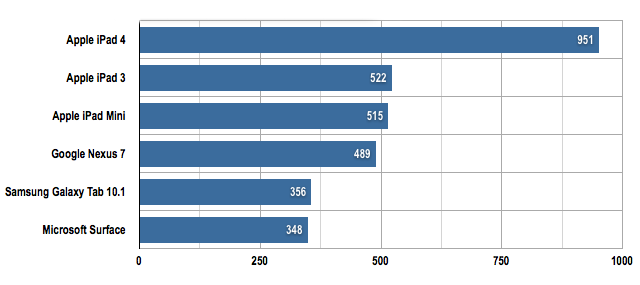
Beyond the screen, the iPad 4 delivers considerably more oomph than its predecessors. The Geekbench testing app showed that the iPad 3’s performance was much the same as the iPad 2’s, but the new model scores considerably higher: 1766 to the iPad 2’s score of 763. That’s in part because the chip is better, but also due to a 40 per cent increase in CPU clock speed.

Despite that, there’s no degradation in battery life - up to ten hours, says Apple, and I concur. If that’s due to a bigger power cell inside


Courtesy, International Business Times

Apple Rumored to Abandon Intel for Its Own Chip

Intel has not been able to ignore rumors that Apple is considering switching some of its Mac's Intel processors to its own A-series of mobile chips, saying it would be a remiss to be dismissive of the rumors.

According to Apple Insider, the claims came on Friday from the Japanese site Macotakara, who successfully predicted the release of the iPad 2 in March, saying that new thunderbolt-equipped MacBook Airs powered by an A5 processor were being tested.


iPhone maker Foxconn hatching US factory expansion plan?

Foxconn, the... manufacturer of kit for Apple, Amazon, Sony, Nintendo, and others, is exploring the possibility of building plants in the US – Detroit and Los Angeles, to be specific.

Those aforementioned market watchers, however, say not to expect your next iPhone or iPad to be made in America – Apple products are too complex to be built by mere 'Mercans.

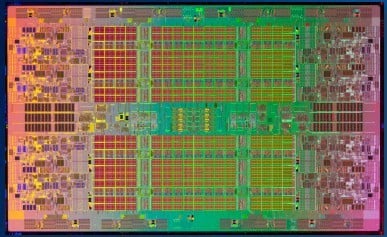
Intel Itanium 9500 die image, courtesy The Register

Intel to slip future Xeon E7s, Itaniums into common socket

The installed bases of HP-UX, NonStop, and OpenVMS users can breathe a sigh of relief if they were hitting a performance ceiling, and so can other server makers such as Bull, NEC, and Fujitsu that have proprietary operating systems that also run on Itanium iron.

The bigger sigh of relief is that Intel is converging the Xeon and Itanium processor and system designs such that future Xeon E7 chips and "Kittson" Itanium processors will share common elements – and, more importantly, share common sockets.

This is something that Intel has been promising for years, and something that HP – the dominant seller of Itanium-based systems – has been craving, as evidenced by its Project Kinetic. Convergence was the plan of record for HP in June 2010 – nine months ahead of the Oracle claim that Itanium was going the way of all flesh – and HP wanted to converge its ProLiant and Integrity server platforms, which used x86 and Itanium processors, respectively. A common socket helps that effort in a big way

Courtesy: HWSW

Oracle: two new SPARC chips next year, and three more under construction

In the first half of 2013, the SPARC T5. Heydar performance during the first SPARC-based systems affected T5 chip - the processor itself to Oracle in August Hot Chips conference, explained in further detail when I got to know of it is based on the company's servers are under testing labs. The insert describing the HWSW you guessed, the T4-based machines favorable market acceptance due to either the end of 2013 can expect the T5 launch of Oracle, Heydar, however, clearly stated: the T5-based machines in 2013 in the first half appear commercially.

S3 is a statement of up to 8 processor cores capable of running parallel threads, manufacturing technology development, however, due to the T5-8 instead of 16 cores is the L3 cache size is doubled to 8 megabytes increased. The memory controller also doubled the number of Oracle, we have four instead of two found in the T5, which are standard DDR3-1066 memory modules continue to be handled. Even the T4 was part of two on-board PCI Express x8 controller from its predecessor, however, was supported only in version 2.0, but the new processor PCI Express Gen3 standard used by Oracle, which is twice the bandwidth, in addition to both separate data management unit was.

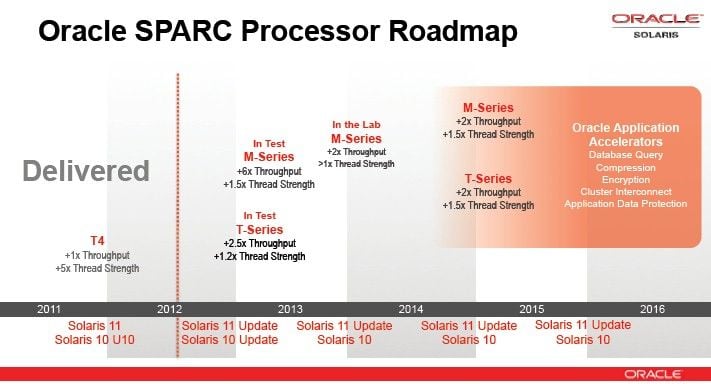
Oracle SPARC Roadmap October 2012, courtesy The Register

Oracle's mighty SPARC plug fries Fujitsu, bigs up new SPARC M4 processor

Oracle, to its credit, has been perfectly blunt about its long-term Sparc server roadmap: it very clearly outlined its goals with rough timelines. That is more than rivals IBM, Intel and Hewlett-Packard do with their high-end system roadmaps, which can be found if you mooch around the internet long enough for someone to accidentally posts something interesting.

And in the M4 presentation, which Oracle refused to share even though it knew the data was out there, we see that the new chip is a beefy version of a Sparc T series chip: it sports six S3 cores that debuted with the eight-core Sparc T4 processors and are used, in a modified form, in the forthcoming Sparc T5 chips. Those cores will share a 48MB L3 cache, a lot more than the 8MB of shared L3 cache used in the 16-core Sparc T5 processors. Presumably the S3 cores used in the M4 have the same 16KB L1 instruction and 16KB L1 data caches, and 128KB of L2 cache, that each S3 core has on the Sparc T4 and T5 processors.


Fujitsu to embiggen iron bigtime with Sparc64-X

with the Sparc64-X processors, which will converge the vanilla and fx versions of the Sparc64 chips into a single products, explained Takumi Maruyama, who is in charge of processor development within Fujitsu's Enterprise Server business unit.

The core has been modified to support the HPC-ACE instructions that accelerated parallel processing and also now includes special accelerators for encryption and other functions – a feature that Fujitsu calls "software on a chip" and akin to the accelerators that Intel, IBM, and Oracle have put into their high-end processors to boost encryption, hashing, and other algorithms.

The Sparc64-X also, thankfully, supports hardware-assisted virtualization, something that has been sorely missing from the Sparc64 series... The chip supports the Sparc V9 instruction set and the extensions to it that Fujitsu has created...

The Sparc64-X core has a deeper pipeline, which enables a higher clock frequency on the processor compared to the Sparc64-VII+, a better branch prediction scheme, bigger queues and floating point registers, more aggressive out-of-order execution, a two-port, multi-banked L1 cache (with twice the bus size and more L1 cache throughput), and a richer set of execution units.

There are two integer execution units, another two virtual address adders that can do double duty as execution units, and four floating point units that can do math and graphics functions. This is twice the number of the integer and floating point units that the Sparc64-VII+ chip had.


Network Management Implications:

Oracle seemed to be correct about Itanium proverbially "going the way of the dinosaur." The common socket seems to be the next move in migration from Intel 64 bit Itanium to the AMD created and Intel copied x64 architecture.

The expression from some analysts that SPARC's life expectancy was limited was certainly pre-mature, appearing to be set to out-live Intel Itanium, and forcing Intel to keep it's x86 line alive much longer than they ever intended. The move by AMD to move the Intel x86 architecture to 64 bits, with the successful seamless migration of SPARC from 32 bit to 64 bit processing were key drivers in forcing Intel to rethink the sunset of x86.

With Apple releasing ARM tablets, fully two to three times faster than competing tablets, one might wonder how long it will be until Apple starts releasing laptops, desksides, desktops, and servers based upon it's own ARM engineering and discard Intel x64? With rumors of MacBook Air's based upon Apple's ARM chipset, this could be a very interesting question. More software seems to be appearing under MacOSX ARM based iOS deviation, rather Intel based MacOSX .

SPARC seems to be proverbially "on the march" with 2 original SPARC vendors (Sun, now owned by Oracle, and Fujitsu) continuing to develop SPARC processors into the distant future, each showing innovation as well as "keeping up with the times" with virtualization.

For businesses continuing to look for a stable environment to build platforms which scale, for long-term network management investments, SPARC continues to be a reasonable investment for long term deployments. Multi-platform and multi-vendor network management seems to be "in the cards" for a long time, if people decide to build to standards, and if vendors decide it is in their best interest to support standards.

Monday, November 5, 2012

Can Oracle REALLY Increase Throughput by 6x?

Can Oracle REALLY Increase Throughput by 6x?

During some SPARC road map discussions, a particular anonymous IBM POWER enthusiast inquires:
How... are 192 S3 cores going to provide x6 throughput of 128 SPARC64-VII+ cores?
The Base-Line:
This is a very interesting question... how does one get to 600% throughput increase with the release of the "M4" SPARC processor? One must consider where engineering is moving from and moving towards.


[from] SPARC64-VII+ (code-named M3)
- 4 cores per socket
- 2 thread per core
- 8 threads per socket


[to] M4 S3 Cores (based upon T4 S3 cores)
- 6 cores per socket (conservative)
- 8 threads per core (normative)
- 48 threads per socket


How to Get There:

Core swap results in 6x thread increase... now that we understand this is purely a mathematical question with definitive end result, the question REALLY is:
How can EACH S3 threads perform on-par with a SPARC VII+ thread?
Let's speculate upon this question:
  • Increasing cores by 50% increase in throughput by 50%
    Threads no longer need to perform on-par, although a 50% per-thread increase is projected.
  • Increase clock rate to 3.6GHz  provides
    ~300% faster per-thread throughput over T1 threads.
  • Out-of-Order Execution
    Another significant increase in throughput over T1-T3 threads.
  • Increase memory bandwidth over old T processors
    Provides opportunity to ~2x socket throughput for instructions & data.
  • Increase memory bandwidth in throughput over previous SPARC64 V* series
    The movement from VII+ based DDR2 to DDR3 offers throughput improvement opportunity
  • Increase cache
    Provides faster per-thread throughput opportunities with S3, but could increase thread starvation.
  • Decrease cores
    Reduce number of cores & threads in a socket, to ensure all thread can run at 100% capacity
 
Of course, it is not only about the hardware, software has a lot to do with it.
  • Produce more database operations (i.e. integer) in hardware, instead of in software, specialized applications such as Oracle RDBMS perform faster on nearly every operation.
  • Add compression in hardware
    I/O throughput increases 500% to 1000% with no CPU impact.
    Oracle 11g RDBMS or Solaris ZFS /w compression hosting any databases see benefit.
  • Solaris ZFS support of LogZilla (ZFS ZIL Write Cache)
    Regular file system applications experience extremely high file system write throughput.
  • Solaris ZFS support of ReadZilla (ZFS Read Cache)
    Regular file system applications experience extremely high file system read throughput.


Oracle does not appear that far off, from producing the numbers they suggest, with standard applications. They have the technology to do every step, from thread performance acceleration, to storage performance accleration, to I/O performance acceleration, to file system acceleration, to application performance acceleration.

A cursory and objective look at the numbers demonstrate how it is possible - it is not solely about the cores... but the cores are key to understanding how it is possible.

Thursday, September 27, 2012

POWER Double Stuff vs SPARC Critical-Thread

[Sun UltraSPARC T3 16 core CPU Diagram]
Abstract:
Computing processor models differ in architecture from one company to another, each trying to gain an edge in the market over their competitors. Often, chip foundries will attempt radical approaches to conquer a problem, but incremental improvement will often bring radical ideas back to similar conclusions in the end. A comparison between SPARC and POWER architectures is no different.


Oracle Today: SPARC T4
It seems that Oracle/Sun approached performance from one direction, from massive thread counts & high throughput, eventually growing to fast cores with a critical thread api - so single threaded bottlenecked software gets more hardware resources dynamically (and only when needed or optionally provisioned at the VM layer.) This was available for a year in the SPARC T4, due to pressure from customers for better single thread performance.

IBM Tomorrow: POWER 7+
Then it seems IBM approached performance from the other direction, from massive single thread speed, incrementing cores, and eventually appearing with a physical socket architecture swap of more cores or less cores (and only at purchase time.) Oddly, this option is only being made a year after the SPARC T4 was released, possibly because of pressure from their customers for higher throughput?


Conclusions:
Which way looks better in practice?

That is a good question. When the SPARC T5 is released, around the same time the POWER 7+ is released - the question will be begged... was IBM's new choice offered to the customer at POWER 7+ purchase time better than the 1+ year old choice offered to the customer while SPARC software at run time (or VM restart time)?

We will have to see what the benchmarks suggest.

Thursday, September 20, 2012

Oracle SPARC Architecture 2011


Abstract:

SPARC has been a multiple vendor central processor unit standard for decades. It is owned by SPARC International, Inc. CPU architectures, such as SPARC, go through various revisions over time. Oracle is in the process of releasing the 2011 Architecture update for SPARC.


Oracle T4 Specification Release:

With the release of the Oracle T4 processor, there was a unified specification, which encapsulates all previous SPARC releases. Darrel Grove, a senior principal software engineer in the Solaris Studio team at Oracle, had posted an updated PDF to the Oracle SPARC Architecture 2011 in his blog at the end of August 2011.

Wednesday, April 11, 2012

Solaris Tab: SPARC White Paper Addendums

The Solaris Tab was recently updated with some white papers.

A new category was added for SPARC White Papers.

White papers were placed in date order, using shortened titles on the top, for easy access, while they were categorized with their full titles on the bottom according to topic.

Solaris Reference Material
2010-04 [PDF] Oracle's Sun SPARC T5120/T5220, T5140/T5240 Server Architecture
2010-04 [PDF] Oracle Sun SPARC Enterprise T5440 Server Architecture
2011-02 [PDF] Oracle's SPARC T3-4, T3-2, T3-1, and T3-1B Server Architecture
2012-02 [PDF] Oracle's SPARC T4-1, T4-2, T4-4, and T4-1B Server Architecture
2012-04 [PDF] How the SPARC T4 Processor Optimizes Throughput Capacity: A Case Study

SPARC White Papers
2010-04 [PDF] Oracle's Sun SPARC Enterprise T5120/T5220 and Oracle's Sun SPARC Enterprise T5140/T5240 Server Architecture
2010-04 [PDF] Oracle Sun SPARC Enterprise T5440 Server Architecture
2011-02 [PDF] Oracle's SPARC T3-4, SPARC T3-2, SPARC T3-1, and SPARC T3-1B Server Architecture
2012-02 [PDF] Oracle's SPARC T4-1, SPARC T4-2, SPARC T4-4, and SPARC T4-1B Server Architecture
2012-04 [PDF] How the SPARC T4 Processor Optimizes Throughput Capacity: A Case Study

Monday, February 6, 2012

SPARC: Road Map Updated!


SPARC: Road Map Updated!

The SPARC Road Map has been experiencing updates at a tremendously accelerated pace over the past few years, with new SPARC releases either happening early, with higher performance, or with a combination of the two. It is quite exciting to see SPARC back in the processor game again!

SPARC T3 Launch: SPARC Road Map
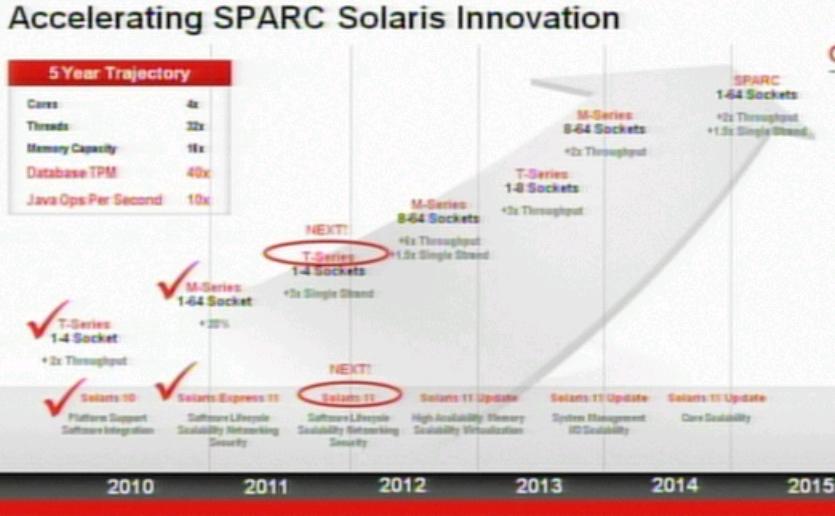
The following SPARC road map was revealed after the 16 core SPARC T3 Launch in Q42010.


Solaris 11 Launch: SPARC Road Map
During the Solaris 11 Launch in November 2011, the following was the SPARC road map, reminding the market of the 8 core T4 processor delivery, with the same performance as the former 16 core processor, and enhanced single-threaded performance.


It was also hinted that the SPARC T5 was ahead of schedule at Oracle - shipping in 2012.


Now, it is February 2012, and the SPARC road map has officially adjusted (although the exact date of when it occurred is unknown, since there was no official announcement.)


SPARC Road Map Analysis
Note the accelerated changes in the SPARC road map over the past few months:
  • The 8 socket T5? processor will perform well enough to replace the M series 8 socket platform in 2012 and be competitive to reach up tothe 16 socket M series.
  • The next 8 socket T5+? processor will perform well enough to replace the M series 8 socket platform in 2013 and be competitive to reach up to the 16 socket M series.

Unified SPARC - T4 Release

It should be noted that Oracle released a T/M unified processor socket called the "SPARC T4" in Q4 2011, which performed as well (or better, depending on the metrics) as the "SPARC T3" (with 128 threads per socket) which was released in 2010, but T4 halved the cores, doubled the speed (or better) of a T3 thread (with 64 threads per socket) and added a new option where thread speed could be 6x faster (with 8 threads per socket.)


Extrapolations and Remembrance
The M-Series was out-of-range for many smaller service providers, while the lower-end T series offered the price-performance to be competitive with only mid-range systems, where platform throughput mattered. The recently released T4 offered more competitive single-threaded speed, to eat away at lower-end open-systems market share. The next generation T-Series, expected later this year, will eat into the market share of more expensive higher-end open-systems market with lower-cost higher-socket counts.

Oracle already hinted that the T5 will have some of the features of the former RK or Rock processor (memory versioning looks like relational memory interface.) The addition of hardware compression, columnar database acceleration, Oracle number accelerations, and low latency clustering (at the socket level) will make it a great Oracle RDBMS & Oracle MySQL database accelerator and an outstanding Oracle RDBMS database accelerator - placing SPARC years ahead of POWER and proprietary x86. The competitive benefit to Network Management systems with large embedded databases (i.e. performance management) will be immense.

This is not the first time that adding accelerators gave SPARC a massive boost - the addition of crypto cores inside the T processors made it the fastest single socket HTTPS server on the market for years and the highest performing contender for scalable encrypted polling engines (for managed service provider class network management vendors.) Non-competitive network management service providers avoided the encryption discussion with SSH and SNMPV3 because they could not "keep up" while competitive software providers out-shined their competition on SPARC. With the recent release of Intel's crypto instructions, that benefit is waning for brand new network management service providers. The compression algorithms in conjunction with database accelerators will have come "just-in-time".

Clearly, the investment in the S3 core provided Oracle with the breathing space it needed, to unify the M and T series, with the lower-end SPARC T4 platforms. With the soon-to-be-released SPARC T5 platforms, Oracle will continue to consume the low-hanging-fruit in the M series (in addition to the AIX and HPUX) space with a high-performing SPARC core which scales to greater socket counts.

Final Thoughts
It appears pretty clear that "NetMgt.BlogSpot.COM" was the first to break the roadmap update news. Continue to manage your networks with obsession and security!