Showing posts with label x. Show all posts

Thursday, April 10, 2014

Window Manager Lineup


[TWM History, courtesy Wikipedia]
Abstract:
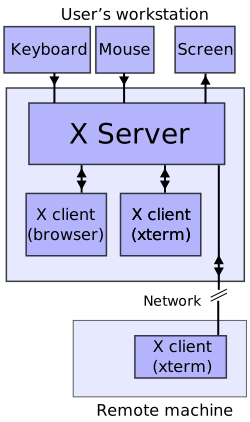
X Windows is a Client-Server based windowing system, where the client applications can run on foreign servers and the X-Windows Server provide resources to the client to run properly, such as Frame Buffer, Keyboard, and Mouse. The X Windows Client application may run on any Hardware or OS Platform, consuming the memory and CPU resources on the remote side, not bound by architecture or byte order to the X Server. This article discusses one such client, the Window Manager.

[X Windows Architecture, Courtesy Wikipedia]

Architecture:
An X Client may consume resources from a single X Server, such as a simple as a Clock Application as complicated as a Desktop Publishing Application. An X Client may consume resources from multiple X Servers for gaming, such as X Tank or X Battle. A special kind of X Client is called the Window Manager. The Window Manager acts as a client, may run as a local client, on the platform hosting the X Server, or it can run on a different platform hosting clients. The Window Manager provides controls to the desktop environment, which is ultimately virtualized through the X Protocol.

[Open Look Virtual Window Manager, courtesy Layer 3 Networking]
Window Manager Lineup
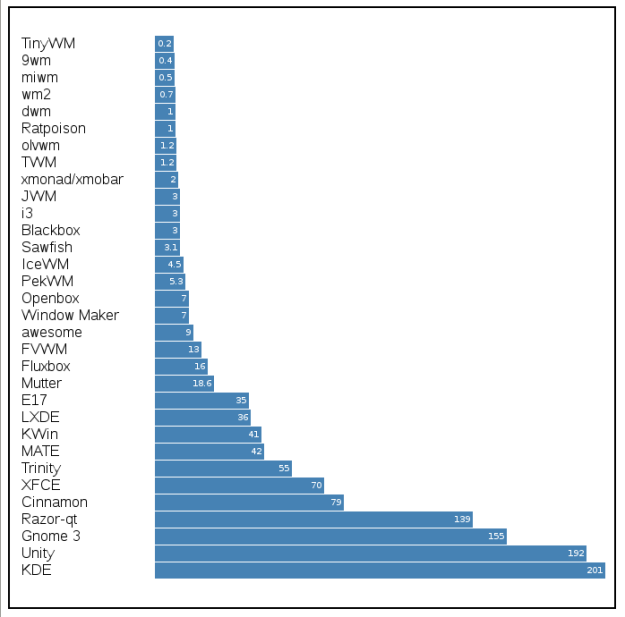
Window Managers come in many different flavors. A recent article on windows managers hit the Layer 3 Networking Blog and offers a view into what may be appropriate for a vendor's virtual desktop environment.

2013-03-17 --- A Memory Comparison of Light... Desktops – Part 1
Fortunately, ...we have plenty of other choices, and we do like change. We have no need to keep using desktops we don’t like.I will describe some of choices in this article, and I’ll attempt to measure the RAM memory requirements. 

2013-04-09 ---  A Memory Comparison of Light... Desktops – Part 2
...I’ve tried to investigate the RAM memory requirements for running some of the most common light window managers and desktop environments available... Prompted by several readers, I’ve decided to include also the big, well-known memory hogs that grab most of the... market, i.e. KDE, Unity and Gnome.

2014-02-15 --- A Memory Comparison of Light Linux Desktops – Part 3
Unused memory goes into a special buffering pool, where the kernel caches all recently used data. If a process attempts to read a file and the kernel already has the file cached, reading it is as fast as reading RAM. Filesystem-heavy task, such as compiling source code, processing video files, etc. benefit from as much free memory as possible in buffering pool. It is not uncommon today to see users with powerful systems running tiling window managers in only a few megabytes of memory.
[Lineup of Window Managers by Resource Utilization, courtesy Layer 3 Networking]

Conclusions:
The author of these articles had placed a disproportionate weight upon Linux, which did not even exist when X Windows was released, so it should be noted that any OS can leverage these Window Managers. The layer of control the Window Manager offers to the virtual desktop user is what is most important for the environment where virtualization is occurring. What really matters is the application being virtualized, not the window manager, so the desktop features required to deliver the virtualized application to the end user is an economics question which this article series provides excellent data points for an architect to leverage in order to make the appropriate business decision.

Tuesday, January 29, 2013

Tab Update: Solaris and X

The following tabs have been updated.
Solaris
OpenWindows / OpenLook Documentation
  • [PDF] X Windows System User Guide - OpenLook Edition (Volume 3) 
  • [PDF] XView Programming Manual (XView Version 3.2 -Volume 7a)
  • [PDF] XView Reference Manual (XView Version 32 - Volume 7b)

X
O'Reilly Books
Motif
[pdf|html] Volume 6A: Motif Programming Manual
...
OpenLook
[pdf] Volume 3: XWindows System User Guide; OpenLook Edition
[pdf] Volume 7A: XView Programming Manual
[pdf] Volume 7B: XView Reference Manual

Thursday, October 4, 2012

X Windows Programming for Script Builders

X Windows Programming for Script Builders

Abstract:

From the original days of computing systems, there were various layers including hardware, firmware, kernel, and shell. As systems became more complex, access to the computer went from serial ports to desktop graphical consoles based upon proprietary windowing systems. Over time, X Windows became the standard environment for desktop UNIX systems. Some hybrid environments were created which combined the textual shell with graphical interfaces - one such environment is "dtksh".

Manuals:

Some of the best manuals available, for X Windows Desktop Korn shell programming are available from Oracle (formerly created by Sun Microsystems.)
  • [html] Common Desktop Environment: Desktop KornShell User's Guide
  • [html] Chapter 1 Introduction to Desktop KornShell
  • [html] Chapter 2 A Sample Script
  • [html] Chapter 3 Advanced Topics
  • [html] Chapter 4 A Complex Script
  • [html] Appendix A dtksh Commands
  • [html] Appendix B dtksh Convenience Functions
  • [html] Appendix C The script_find Script
  • [html] Common Desktop Environment: Programmer's Overview
  • [html] Common Desktop Environment: Programmer's Overview / Desktop Korn Shell (dtksh)


Solaris:

Since the advent of CDE, Solaris shipped "dtksh" and examples with their operating system. The following are examples on a Solaris 10 platform.
V240/user$ cd /usr/dt/share/examples/dtksh
V240/user$ ls -al
total 140
drwxr-xr-x 2 root bin 512 Jan 2 2010 .
drwxr-xr-x 20 root bin 512 Jan 2 2010 ..
-r-xr-xr-x 1 root bin 2487 Dec 17 2004 CallbackTest2
-r-xr-xr-x 1 root bin 4645 Dec 17 2004 CallDataTest4
-r-xr-xr-x 1 root bin 10674 Dec 17 2004 crMovesText1
-r-xr-xr-x 1 root bin 1736 Dec 17 2004 DtCursorTest2
-r-xr-xr-x 1 root bin 5265 Dec 17 2004 DtWsTest1
-r-xr-xr-x 1 root bin 6007 Dec 17 2004 EventHandlerTest
-r-xr-xr-x 1 root bin 1870 Dec 17 2004 ListBounds1
-r-xr-xr-x 1 root bin 2249 Dec 17 2004 ListItemPos1
-r-xr-xr-x 1 root bin 1847 Dec 17 2004 ListPosSel1
-r-xr-xr-x 1 root bin 1463 Dec 17 2004 PopupTest
-r-xr-xr-x 1 root bin 1677 Dec 17 2004 SelBoxResTest
-r-xr-xr-x 1 root bin 4097 Dec 17 2004 SessionTest
-r-xr-xr-x 1 root bin 2865 Dec 17 2004 TextCutBuf1
-r-xr-xr-x 1 root bin 2326 Dec 17 2004 TextDisp1
-r-xr-xr-x 1 root bin 1829 Dec 17 2004 TextFXYPos1
-r-xr-xr-x 1 root bin 2518 Dec 17 2004 TransEventTest
-r-xr-xr-x 1 root bin 2168 Dec 17 2004 TransTest1
-r-xr-xr-x 1 root bin 990 Dec 17 2004 WorkProcTest1
-r-xr-xr-x 1 root bin 4033 Dec 17 2004 XdrawTest

Other Examples:

Former Sun engineer Brendan Gregg includes a variety  of examples on his personal web page, regarding "dtksh".

Wednesday, May 25, 2011

X Windows Information Update


The X Windows System tab on Network Managment has been created:
  • Various releases of the open-source X Windows System, bundled with nearly every OS for the past 20 years
The tab has been updated with additional materials
  • Third party X Windows Server vendors, for people using proprietary Microsoft Windows
  • Scripting to build X Windows Applications in wksh and dtksh

Monday, April 25, 2011

X Windows: XRECORD Extension


X Windows: XRECORD Extension

Abstract:
The X Windows XRECORD Extension allows for a free framework to observe and record graphical activities of an X Windows client program running on an X Server. The XRecord extension may have been released with X11 release 6.1, although documentation was released from with X11 release 6.4. The extenions may be leveraged for security purposes (i.e. auditing), careful watching of an X Server for smoother remote frame buffer implementations, or even for automating testing procedures.

Definition:
[html | pdf] --- XRecord Extension Library - Version 1.13 - X Consortium Standard - X Version 11, Release 6.4 - Copyright © 1994 Network Computing Devices, Inc - Copyright © 1995 X Consortium

Example Uses:
[html | pdf] --- Version 0.7.2beta of x11vnc - The X RECORD extension is used to detect some scrolls.

[html | pdf] --- PyKeylogger is a free open source keylogger written in the python

[html | pdf] --- Xnee is a suite of programs that can record, replay and distribute user actions under the X11 environment. Think of it as a robot that can imitate the job you just did.

[html | pdf] --- AutoKey is a desktop automation utility for Linux and X11. It allows you to manage collection of scripts, and assign abbreviations and hotkeys to these scripts allowing you to execute them on demand in whatever program you are using.

[html | pdf] --- Issues in Fedora 10

[html | pdf] --- X RECORD extension C Code example.

[html | pdf] --- Record keystrokes via Per module.

[html | pdf] --- Apple MacOSX vnc2swf to record vnc and aqua sessions.

[html | pdf] --- vnc2swf, to record vnc sessions in macromedia shockwave files.

[html | pdf] --- vnc2flv, to record vnc sessions in adobe flash files.

[html | pdf] --- screencasting under Solaris.

[html | pdf] --- How to Create a Flash Demo using Vnc2swf.

[html | pdf] --- Recording your screen in Solaris works right out of the box. All you need to install is vncserver and vnc2swf.


Commercial Uses:
[html | pdf ] --- The Pose technology is used for exactly and totally recording (capture) and later or simultaneous playback of X11 sessions or individual applications, optionally together with audio, video, or arbitrary binary data streams. The recording may be converted to video formats

Monday, November 8, 2010

Graphical User Interfaces: X and Beyond


Graphical User Interfaces: X and Beyond

Abstact:

There has been much discussion lately regarding the core of Desktop User Interfaces. Mark Shuttleworth has been guiding the Ubuntu Community to move toward Wayland. Long time X community contributor Allen Coopersmith had added some clarification of his own, regarding X11 long time stability and future viability. It is healthy to go through the discussion of display systems occasionally, for the newer programmer.

History:

The disucssion of desktop systems for UNIX is a re-occurring theme. This is in no way an exhaustive history, nor is it ment to be 100% accurate in comparing features of one system against another- not all desktops are created equal in capability or sophistication. Many of these systems relied upon X11, while others did not.


Most UNIX systems used TTY for access on early systems.


Terminals leveraged curses libraries for full screen usage. Various UNIX System V platforms built menuing systems upon the curses library through Form and Menu Language Interpreter or FMLI and enhanced the user experience through Framed Access Command Environment or FACE.


Solaris started with SunView, moved to OpenWindows, used NeWS with Display Postscript, and evetually started down the course of converging to a 100% open-source X11 system. The windowing system was based upon olwm and appeared on AT&T UNIX as well as Solaris.


There is a virtualized window manager based upon OpenWindows called OLVWM, which conforms to the OPEN LOOK standard, but Solaris had decided to abandon Open Look Window Manager or olwm in a later unification effort.

As X Windows became more popular, some vendors of UNIX offered graphical augmented enhancements, such as NCR's XFMLI. Sun received an infusion of cash from AT&T and AT&T purchased NCR. The use of FMLI within AT&T was phenominal by it's user community and the use of XFMLI by NCR was used to modernize the desktop without the necessity to change the investment of FMLI from the System V code base. Solaris even added an FMLI interface to the Live Upgrade OS feature.

Solaris started the process of abandoning FMLI and FACE, for enhanced terminal based user experience, in the mid 2000's, citing internationalization overhaul as a primary motivation.

A group of vendors aligned against Sun and AT&T (who standardized on OPENLOOK) with an alternative GUI referred to as Motif. It was basically a copy of an IBM standard, which IBM followed for OS/2 and Microsoft copied with Window 3.1. There was an open-source version attempted called Open Motif. This was later abandoned with a later unification effort.


Next's NextStep brought a new level of competition to Sun Solaris. A move was made to converge with OpenStep. An open-source version was attepted with GNUstep. Next was founded by former Apple CEO, Steve Jobs, and Next was re-purchased by Apple. The usage of PDF instead of Postscript was used at the heart of the environment. At this point, the NextStep & OpenStep environments were implemented in Apple hardware, from the desktop, to the server, laptop, notebook, and handheld environments.


Vendors dug in their heels, in what is now sometimes referred to as the UNIX Wars. Eventually, concensus was derived between most vendors with the consolidation of OPEN LOOK and MOTIF to Common Desktop Environment or CDE. The tools from Sun's original SunView, which were ported to OPEN LOOK, were ported, using the look and feel of MOTIF. Solaris has since decided to abandon CDE in the mid 2000's.


During the time of UNIX vendors were working towards a new standard desktop, some other desktops have been receiving activity. GNOME was a very important project. GNOME was adopted by various Linux vendors as a default desktop. Solaris adopted a varient of GNOME, called Java Desktop Environment as their standard going-forward environment in mid 2000's.

There was another competing open source environment to GNOME called KDE. KDE was offered as a secondary option on various Linux vendor desktops. Solaris offered KDE as a freeware add-on.


There was a very forward looking attempt at an open-source modern desktop environment written in Java by Sun called Project Looking Glass. The project seemed to die in mid 2000's, possibly from a threatened lawsuit by Apple. Many features later appeared in MacOSX. Other features were later copied into Windows 7.

Thoughts:

With so much of the Open Systems community based upon remote devices and servers, it seems incomprehensible that mechanisms to allow simple administration (via TTY, FMLI, XFMLI, and X11) to be replaced by multiple levels of complexity (web server, web browser, XML, AJAX, HTML#, CSS, etc.) HTML was basically a static-page serving system which had been hacked together to become more dynamic, but the efficiency is no where near TTY of X as far as overhead is concerned.

This being said, there seems to be a drive in this community to move towards better user experience, on the desktop, at the expense of their core-constituency on the server and embedded devices.

  • How much of Looking Glass could be reused?
    (The project focus shifted to Project Wonderland, which is now OpenWonderand.)
  • Wasn't there already a significant effort to build OpenStep that could be leveraged?
  • How much of the GUI and Drivers associated with Darwin under MacOSX are OpenSource and could be leveraged?
Since there is a popular and fairly well documented API [for desktops, mobile, and semi-mobile systems], one might think taking an older [OpenStep] code base [from, arguably, the most popular user-facing UNIX systems in the world], and making it an excellent option.

Since Java runs everywhere and it is maintained by major corporations, as well as a fledgling open source project, Looking Glass would bring tremendous revoution to the Open Systems Desktop, and make it current with open source MacOSX as well as propriatery Windows 7.

Architecture Process Proposal:

If this author were involved in the management of this project, a table of access methods would be built (TTY, X11, Display Postscript, PDF, HTTP/HTML, Direct Frame Buffer), table of raw features (line, circle, arc, font, cursor, box, etc.), table of derived features (window, menu, window manager, table wiget, etc.), and design a meta-languge that is both forwards & backwards compatible across the access methods.

This does not mean that every more complex feature would be suppoted by a simpler access method, but at least there should be a correlary to most and a universal benefit to all communities. Resources could then be leveraged from the core-constuency of the Open Systems markets and everyone could take away a benefit to their perspective community & commercial company.

Postscript:

By the way, I love X. The older X based applications were always fast, in comparison to modern toolkit based X applications. Applications built in X ran phenominally fast when ported [without the X protocol] to Microsoft Windows [in comparison to native MS developed GUI's.] Developers made a significant mistake by not concentrating on simplicity & speed when generating newer user experience environments. Every generation of desktop from SunView to OpenWindows, CDE, and GNOME became substantially heavier. Working with NextStep next to a SunView system made the Next platform much more appealing, from a performance perspective as a user.

The lack of decent TTY based GUI interfaces extended to X Windows by Open Vendors created a problem of system administration of servers, routers, firewalls, storage servers, network switches, wireless access points, kiosks, cash registers, etc. These platforms are the core-constituency of the Open Systems world. All of the vendors need to create proprietary menuing systems because of these holes, while they could be spending more time on developing Open Systems instead of this code which should be written once.

Companies like Sun, AT&T, Next, and Apple capitalized on simplifying the user interface [SunView, OpenLook, NextStep, Aqua] in the UNIX world. Newer graphics cards and CPU instruction set enhancements should be make our lives EASIER by removing code, instead of adding code, from the supportable code-base. The fact that people are considering re-writing the entire stack of code from the ground-up to replace X is a key factor that should tell us that something is deeply wrong with our current thinking, understanding of history, and understanding our current customer base.