Showing posts with label SMARTS. Show all posts

Friday, January 17, 2014

EMC Smarts: Watch4Net APG Data Purging


A short note about default behavior within EMC Smarts Watch4Net APG
How to delete a device in Watch4Net. 
With default settings, APG will delete a device (or one of its component) and its history if it’s not updated for 1 full year. However, for some reason, you may want to manually override this behavior without changing the automated configuration. APG provides a tool that allows you to delete data from the database. It’s only available to administrative users, in the “Administration” pane and it’s called “Management of APG Metrics”. To use this tool, you have to:
• Set a filter to select the data to delete
• Type in the maximum number of results
• Check whether or not the last timestamp is displayed
• Select the properties to show
• Then, click the “Query” button
• Results will appear in the box below
• Last, just click the “Delete” button to delete all these data from APG 

There is no out-of-the-box way to de-provision from the command line.
Conclusions:
If a site runs out of licenses, the GUI may crash and refuse to remain running... a very poorly written application result - but hey, EMC is not supporting high-end platforms like Solaris any longer, so what can you expect? Make sure you have spare licenses within Watch4Net to handle customer on boarding and off boarding - otherwise you may have some unexpected results!

Wednesday, November 7, 2012

Solaris 10: Update 11 Coming Soon!

Solaris 10: Update 11 Coming Soon!

As previously noted in Rick Hetherington's interview, there appears to be a Solaris 10 Update 11, near ready to be released.

While Oracle recently released Solaris 11.1, the rest of us are waiting for Solaris 10 refresh. The main driver appears to be the SPARC T5 support, since this release was mentioned during Rick's interview.

Importance to Network Management
Since most network management platforms run under SPARC Solaris 10 - this is an important update. It ensures that managed services providers targeting network management will be able to get the latest SPARC T5 hardware - to get their much desired platform performance boost. Being able to manage 2.5x the number of devices in a similar price-point means excellent opportunity to be more competitive in bids.

Oracle needs to provide incentives to Network Management ISV's (such as EMC SMARTS) to port their software to Solaris 11, for Solaris 11 to be considered a Tier 1 supported platform. Oracle's forever-support of Solaris 10 is only a stop-gap measure. The SPARC T5 and Solaris 10 Update 11 can not come too soon!


Monday, September 24, 2012

EMC: Shakeup and Network Managment Implications

[image courtesy: blog of Chuck Hollis, EMC VP --Global Marketing CTO]
Changes at EMC

EMC has been going through a great deal of changes over the years.

2003-12 - [html] - EMC Purchases VMWare for Hypervisor
2004-12 - [html] - EMC Purchases SMARTS for Network Fault Management
2007-11 - [html] - EMC Purchases Voyence for VoyenceControl
2009-11 - [html] - VMWare, EMC, Cisco Announce VCE (Virtual Computing Environment) VBlock Architecture
2012-05 - [html] - EMC Purchases Watch4Net for APG
2012-06 - [html] - Cisco, NetApp Announce FlexPod Architecture
2012-06 - [html] - EMC Produces Own Blade Servers

Some of internal changes are more political rather than product infrastructural.

2012-09 - [html] - EMC CEO Succession Politics

During EMC world, Oracle was made to look like the red-headed bastard step child, while SPARC hardware probably drives more EMC storage than either company cares to acknowledge.
Implications to Network Management

EMC had normally played well in the multi-vendor environment, because they were a software and storage company - they would sell disks and software to anyone who used any vendor's equipment. This started to change in 2003.

With the acquisition of VMWare in 2003, there was an internal drive to virtualize more software in the proprietary Intel space, rather than play in the Open Systems space. With the VCE announcement, using Cisco to push into the carrier space further pressed the Open Systems vendors.  In 2012, with the announcement from Cisco to partner with NetApp and EMC producing their own blades, the internal political pressure to abandon Open Systems will continue.
Ironically, historical analysis of performance, configuration, and event data from Network and Systems Management platforms drove the need for robust disk storage systems... Telecommunications Market -was one of the original Big Data platforms. Big-data using off-the-shelf network management software requires Open Systems (with massive vertical [socket-count] and horizontal [blade-count] scalability.) No robust system implemented under traditional Open Systems platforms would be done, without external EMC storage. The push away from Open Systems platforms (to lower-end Linux & Windows platforms) ironically drives EMC storage out of the solutions... yet this [increasingly] is the direction from EMC.

Will the investment of Open Systems management tools from SMARTS, Voyence, and Watch4Net continue to be made by EMC - with the transition from EMC CEO Joe Tucci? EMC recently killed cross-vendor object storage. With VMWare CEO Paul Maritz assuming a higher profile, will the traditional EMC suffer greater loss in their EMC Network Management and EMC storage customer bases? Pat Gelsinger, president and COO of EMC's Information Infrastructure Products, became CEO of VMware, which may offer greater influence for Open Systems management in VMWare's proprietary Intel sphere.

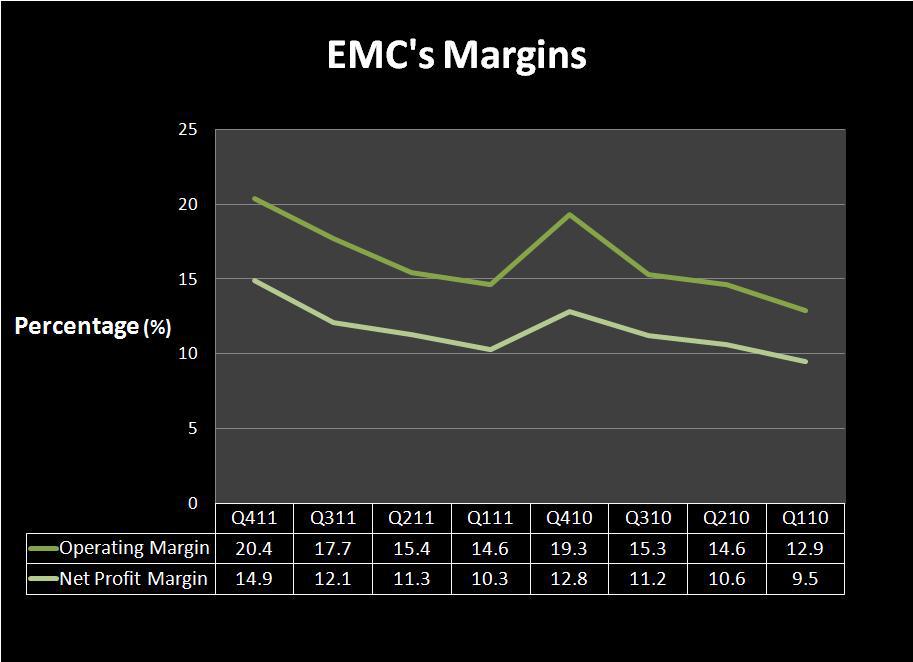
[Graph courtesy: seekingalpha.com article]
Traditional Network, Systems, Storage, and Security Management may be losing the last viable multi-vendor player, as the industry consolidates into vertical, proprietary stove-piped systems. It is really EMC's choice as to whether their political structure decides to carry the Open Systems banner and say "we are different - we manage everything on everything" (and are worth the premium we charge) or whether they choose to lose the moral high ground offered by Open Systems and suffer the lower profit margins of a solely proprietary Intel platform [which offers no marketing differentiation.]

[Tombstone of Elizabeth in Yangzhou courtesy: wikimedia.org]
If EMC's SMARTS, VoyenceControl, and APG will not "manage everything on anything" in the near future: EMC will lose their main competitive position against dominate industry players like HP & IBM. Without "everything on anything" - EMC will not be worth the money they currently charge. Any two-bit open source network & systems management framework supports "management of everything on anything"... so if EMC continues to choose vertical isolation [with the abandonment of Open Systems such as Itanium, POWER, and SPARC] - EMC's may soon no longer be "the only game in-town" and there will no longer be the need to even consider EMC as a competitor to Tivoli and OpenView. Ignoring a great marketing feature and poor management decisions will result in the death of EMC NSM.

Thursday, June 14, 2012

Network Management at EMC World 2012

 
[EMC World 2012 Man - courtesy: computerworld]

Network Management at EMC World 2012

Abstract:
EMC purchase network management vendor SMARTS with their InCharge suite, a number of years ago, rebranding the suite as Ionix. EMC purchased Voyence, rebranding it as NCM (Network Configuration Manager). After EMC World 2012, they completed the acquisition of Watch4Net APG (Advanced Performance Grapher.) The suite of these platforms is now being rolled into a single new brand called EMC IT Operations Intelligence. EMC World 2012 was poised to advertize the new branding in a significant way.
Result:
EMC World 2012 in Las Vegas, Nevada was unfortunately pretty uneventful for service providers. Why was it uneventful?

The labs for EMC IT Operations Intelligence did not function. There were a lot of other labs, which functioned, but not the Network Management labs. EMC World 2012 was a sure "shot-in-the-head" for demonstrating, to service providers, the benefits of running EMC Network Management tools in a VM.

After 7 days, EMC could not get their IT Operations Intelligence Network Management Suite running in a VMWare VM.

Background:
Small customers may host their network management tools in a VMWare VM. Enterprises will occasionally implement their network management systems on smaller systems, where they know they will get deterministic behavior from the underlying platform.

Service Providers traditionally run their mission critical network management systems on larger UNIX Systems, so as to provide instant scalability (swap in CPU boards) and 99.999 availability (reboot once-a-year, whether they need to or not.)

The platform of choice in the Service Provider market for scalable Network Management platforms has been SPARC Solaris, for decades... clearly, for a reason. This was demonstrated well at EMC World 2012.

The Problem:
Why not host a network management platform in a VMWare infrastructure? Besides, the fact that EMC could not make it happen, after 1 year of preparation, and 7 days of struggling... there are basic logistics.

Network Management is dependent upon ICMP and SNMP.  Both of these protocols are "connectionless protocols" - sometimes referred to as "unreliable protocols". Why would a network management platform use "unreliable protocols"?

The IETF understands that network management should always be light (each poll is a single packet, while a TCP protocol requires a 3-way handshake to start the transaction, poll the single packet, then break down with another 3-way handshake. Imagine doing this for thousands of devices every x seconds - not very light-weight, not very smart. A "connection based protocol" will also hide the nature of an unreliable underlying network, which is what a network management platform is supposed to expose - so it can be fixed.

Now stick a network management platform in a VM, where the network connection from the VM (holding an operating system, with a TCP/IP stack), going down through the hypervisor (which is another operating system, with another TCP/IP stack, which is also sharing the resources of that VM with other VM's.) If there is the slightest glitch in the VM or the hypervisor, which may cause the the packets to be queued or dropped - the actual VMWare infrastructure will signal to the Network Management Centers that there is a network problem, in their customer's network!

Politics:
Clearly, someone at EMC does not understand Network Management, nor do they understand Managed Service Providers.

The Network Management Platform MUST BE ROCK SOLID, so the Network Operations Center personnel will NEVER mistake a alerts in their console from a customer's managed device as a local performance issue in their VM.

With EMC using Solaris to reach into the Telco Data Centers,  EMC later using Cisco to reach into the Telco Data Centers - EMC is done using their partners. VMWare was the platform of choice, to [not] demonstrate their Network Management tools on. Cisco was the [soon to be replaced] platform of choice, since EMC announced they will start building their own servers.

Either someone at EMC is sleeping-at-the-wheel or they need to get a spine to support their customers. Either way, this does not bode well for EMC as a provider of software solutions for service providers.


Business Requirements:
In order for a real service provider to reliably run a real network management system in a virtualized environment:
  • The virtualized platform must not insert any overhead.
  • All resources provided must be deterministic.
  • Patches are installed while the system is live.
  • Engagement of patches must be deterministic.
  • Patch engagement must be fast.
  • Rollback of patches must be deterministic.
  • Patch rollback must be fast.
  • Availability must be 99.999.  


Solutions:
There are many platforms which fulfill these basic business requirements, but none of them are VMWare. Ironically, only SPARC Solaris platform is currently supported by EMC for IT Operations Intelligence, EMC does not support SPARC Solaris under VMWare, and EMC chose not to demonstrate their Network Management suite under a platform which meets service provider requirements.

Today, Zones is about the only virtualized technology which offers 0%-overhead virtualizataion. (Actually, on SMP systems, virtualizing via Zones can increase application throughput, if Zones are partitioned by CPU board.) Zones, to work in this environment, seem to work best with external storage providers, like EMC.

Any platform which offers 0% virtualization penalty with ZFS support can easily meet service providers technical platform business requirements. Of these, the top 3 are probably the best supported by commercial interests
  • Oracle SPARC Solaris
  • Oracle Intel Solaris
  • Joyent SMART OS
  • OpenIndiana
  • Illumian
  • BeleniX
  • SchilliX
  • StormOS
Conclusion:
Today's market is becoming more proprietary each passing day. The movement towards supporting applications only under proprietary solutions (such as VMWare) has demonstrated it's risk during EMC World 2012. A network management provider would not be well advised to use any network management tool which is bound to a single proprietary platform element and does not support POSIX platforms.

Tuesday, May 22, 2012

EMC: DataBridge


EMC: DataBridge
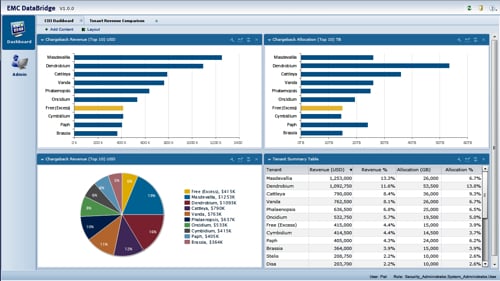
The Register posted an interesting article regarding EMC DataBridge, which is being displayed during EMC World 2012 in Las Vegas Nevada this week.
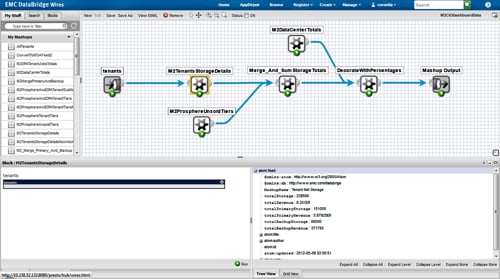
DataBridge will support EMC's ProSphere, Data Protection Advisor, Unified Infrastructure Manager, IT Operations Intelligence Suite, Storage Configuration Advisor and EMC AppSync… There will be two DataBridge apps from EMC covering chargeback and resource analysis for visualisations of storage capacity utilisation… Actually DataBridge has an obvious possible extension to cover Vblocks, with storage, network and compute data coming across the data bridge, as it were, from the Vblock's component Cisco and EMC physical gear and the VMware software gear.


What makes this interesting are the variety of software platforms covered in the EMC DataBridge solution. It is a good sign to see them brought in under a single umbrella.

Network Management Connection
EMC is primarily a storage company, which did not have a real management solution for complete storage solutions... but at least they understood managed services. They produced a suite of applications to manage their storage solutions, which were available under multiple hardware and multiple OS platform vendors.

There was a company called SMARTS (an acronym for Systems Management ARTS) which specialized in multi-vendor network fault management (the suite was branded as SMARTS InCharge.) SMARTS understood managed services accounts, where multiple hardware and OS platform vendors were supported. They were later purchased by EMC with their tool suite rebranded as EMC Ionix. Now, EMC's management tool suite is being rebranded again as IT Operations Intelligence Suite, as can be seen above as one of the feeds into DataBridge. Once again, SMARTS was available under multiple hardware and OS platform vendors.

There was another company called Voyence, which specialized Configuration and Policy Management of multi-vendor network equipment. Voyence was considered a best-in-class provider, also attractive to the Service Provider business, since they supported multiple hardware and OS platform vendors. They were also purchased by EMC. Their product was brought under the Ionix umbrella and re-branded as NCM or Network Configuration Manager. This is rolled into IT Operations Intelligence Suite.

EMC also purchased a hypervisor company called VMWare. The union of EMC with VMWare seemed to be odd, but it started to become more clear. With EMC providing storage and hypervisor, they partnered with Cisco, and produced a product called Vblock, noted in the article. This is where EMC began to lose focus on Managed Services arena. Multi-hardware and OS vendor support disappearing from their portfolio, it seems EMC is dropping support for platforms which will not run in their proprietary VMWare hypervisor.

Conclusion:
While DataBridge looks like an interesting for EMC shops, it should be noted that EMC appears to be backing away from Managed Service Accounts. VMWare still runs on other platforms, besides Cisco, but one might suggest (from recent EMC history) that is only the case because EMC did not buy Cisco.

If DataBridge will capable of running on any non-VMWare hosted operating system, that would be a surprise with EMC's trend to abandon Managed Services Accounts. If EMC wants DataBridge to be a serious competitor in the market, EMC will have to demonstrate a commitment to partners not locked into VMWare.

Monday, March 7, 2011

EMC Ionix: Integration Basics (part 4) - Traps


EMC Ionix: Integration Basics (part 4) - Traps

Abstract:
Network Management platforms normally have a variety of modules which interlock together. The different managers often subscribe to information from the underlying managers. The Open Integrations manager (OI) and Service Assurance Manager (SAM) are two such managers. The fields of data available in the OI, which can be subscribed to from the SAM is configurable. The SNMP Trap Manager can be used to feed information into Ionix from other Network Management tools.


History:
In Part 1 of the series, we discussed dmctl and sm_adapter integration points into Ionix. In Part 2, we discussed the reporting of events from the Ionix infrastructure via sm_ems. In Part 3, inserting alerts into the system via sm_ems command was discussed as well as some of the underlying architecture. This article will discuss the use of the SNMP Trap Adapter to integrate alerts into EMC Ionix, formerly known as SMARTS InCharge.

Trap Adapter Instantiation:
The Ionix suite allows for one or more SNMP Trap Adapters to be provisioned onto a single server, depending on the number of network interface cards which are available.

To see how a trap manager is instantiated, the sm_service command is used:
sunsparc/user777$ sm_service show --cmdline TRAP-39
sm_service install --force --unmanaged --startmode=runonce \
'--name=TRAP-39' \
'--env=SM_SITEMOD=/opt/InCharge7/SAM/smarts/local39' \
'--env=SM_WRITEABLE=/opt/InCharge7/SAM/smarts/local39' \
'/opt/InCharge7/SAM/smarts/bin/sm_trapd' \
'--name=TRAP-39' \
'--server=OI-39' \
'--config=icoi' \
'--port=162' \
'--sport=35039' \
'--useif=192.168.1.39' \
'--model=sm_actions' \
'--output=TRAP-39.log' \
'--rules=icoi-trapd/trap_mgr_parse.asl'

The "rules" file holds the information required in order to adjust the OI and SAM to differentiate between which SNMP Trap Receiver is sourcing the messages.
sunsparc/user777$ cd /opt/InCharge7/SAM/smarts/local39
sunsparc/user777$
ls -al rules/icoi-trapd/trap_mgr_parse.asl
-r--r--r-- 1 root root 50263 Nov 20 02:52 rules/icoi-trapd/trap_mgr_parse.asl
By adjusting the "ics_domain_name" parameter, sources can be differentiated.
sunsparc/user777$ cd /opt/InCharge7/SAM/smarts/local39
sunsparc/user777$
grep TRAP-39 rules/icoi-trapd/trap_mgr_parse.asl
ics_domain_name = "TRAP-39"
There are two major files used to configure the trap daemons:
sunsparc/user777$ cd /opt/InCharge7/SAM/smarts/local39
sunsparc/user777$
ls -al conf/icoi/trap*conf
-rwxrwxr-x 1 smarts nsm 7933 Nov 19 17:23 conf/icoi/trapd.conf
-rwxrwxr-x 1 smarts nsm 90785 Mar 4 21:06 conf/icoi/trap_mgr.conf
Configuring individual VarBinds ("Variable Bindings") or parameters to the SNMP Trap, can be mapped in the "trap_mgr.conf" file into different fields in the Ionix system.

The "trapd.conf" file will configure the trap daemon, once it is instantiated by "sm_service".

Wednesday, March 2, 2011

EMC Ionix: Integration Basics (part 3)


EMC Ionix: Integration Basics (part 3)

Abstract:
Network Management platforms normally have a variety of modules which interlock together. The different managers often subscribe to information from the underlying managers. The Open Integrations manager (OI) and Service Assurance Manager (SAM) are two such managers. The fields of data available in the OI, which can be subscribed to from the SAM is configurable.


Architecture:
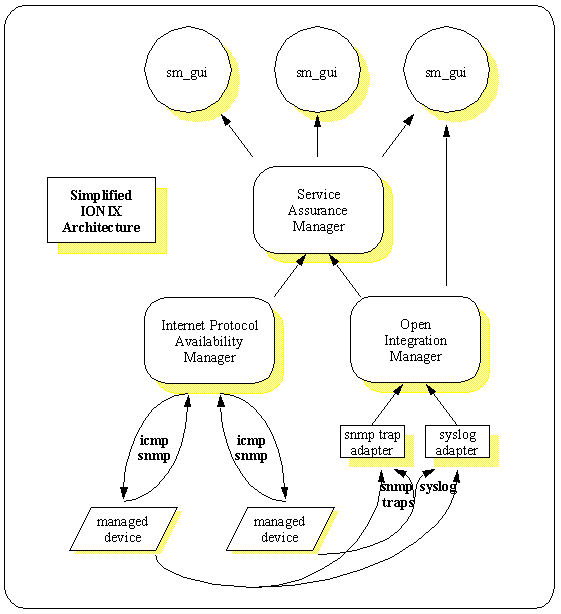
The minimum modules available to make a workable system in a network management infrastructure include components such a graphical user interface , manager of managers, mid-level manager, and a polling manager. In EMC (formerly SMARTS) Ionix (formerly InCharge), the GUI (sm_gui) will subscribe to a Manager of Managers (SAM) or a mid-level manager (OI), which can subscribe to a polling type of manager (ex. IP Availability Manager) or some other kind of adapter (i.e. Syslog or SNMP Trap) correspondingly.

Configuring Subscriptions:
The subscriptions at the Open Integration layer can be configured through a command line file. For Version 7 of the software, this subscription interface is located:
/opt/InCharge7/SAM/smarts/local/conf/ics/dxa-oi.conf
Attributes to notifications can be passed up from underlying adapters, like the trap adapter or syslog adapter, through the OI, and ultimately to the SAM. Some attributes are designed to be passed-through (i.e. UserDefned attributes) while other attributes are designed to be manipulated at the SAM layer (i.e. maintenance mode, owner, trouble ticket id, etc.) This can be observed in the configuration of the file.
sunsparc/user777$ more /opt/InCharge7/SAM/smarts/local/conf/ics/dxa-oi.conf
...
notification
#attr Acknowledged
#attr InMaintenance
#attr Owner
#attr TroubleTicketID
attr UserDefined1
attr UserDefined2
attr UserDefined3
attr UserDefined4
attr UserDefined5
attr UserDefined6
attr UserDefined7
attr UserDefined8
attr UserDefined9
attr UserDefined10
Ticketing interfaces are normally managed at the SAM layer, but if there is a desire to pass this information through the OI, this line can be uncommented, in order to pass ticketing along through the OI layer to the SAM.

Demonstrating Subscriptions:

To summarize all notification list from the 3rd SAM instance, which can be subscribed to by an sm_gui:
sunsparc/user777$ sm_ems -s SAM-03 summarize
*****************************************
******SUMMARIZE NOTIFICATION LIST********

ClassDisplayName = Host
InstanceDisplayName = ABC_ACAZ02_BR
EventDisplayName = Down
Active = FALSE
Acknowledged = TRUE
Category = Availability
TroubleTicketID =
Owner = SYSTEM

ClassDisplayName = Host
InstanceDisplayName = ABC_AWKU55_ID
EventDisplayName = Down
Active = TRUE
Acknowledged = FALSE
Category = Availability
TroubleTicketID =
Owner =
...
This list looks identical to the Open Integrations manager instance 30, which is feeding notifications to the SAM instance 3 (note, in this implementation, there are no polling managers, only passive snmp trap managers.)
sunsparc/user777$ sm_ems -s OI-30 summarize
*****************************************
******SUMMARIZE NOTIFICATION LIST********

ClassDisplayName = Host
InstanceDisplayName = ABC_ACAZ02_BR
EventDisplayName = Down
Active = FALSE
Acknowledged = TRUE
Category = Availability
TroubleTicketID =
Owner = SYSTEM

ClassDisplayName = Host
InstanceDisplayName = ABC_AWKU55_ID
EventDisplayName = Down
Active = TRUE
Acknowledged = FALSE
Category =
TroubleTicketID =
Owner =
...

A change in the Category at the OI level, will propagate to the SAM.
sunsparc/user777$ sm_ems -s OI-30 \
update Host ABC_ANPN33_ID Down Category=Availability

sunsparc/user777$ sm_ems -s OI-30 summarize
*****************************************
******SUMMARIZE NOTIFICATION LIST********
...
ClassDisplayName = Host
InstanceDisplayName = ABC_AWKU55_ID
EventDisplayName = Down
Active = TRUE
Acknowledged = FALSE
Category = Availability
TroubleTicketID =
Owner =
...


sunsparc/user777$ sm_ems -s SAM-03 summarize
*****************************************
******SUMMARIZE NOTIFICATION LIST********
...
ClassDisplayName = Host
InstanceDisplayName = ABC_AWKU55_ID
EventDisplayName = Down
Active = TRUE
Acknowledged = FALSE
Category = Availability
TroubleTicketID =
Owner =
...

If a similar "update" action was done to the TroubleTicketID field at the OI level, it would not propagate. Such an action would need to be done directly against the SAM, unless the OI was configured to allow TroubleTicketID to be an attribute eligible to be subscribed to.

Friday, February 18, 2011

EMC Ionix: Integration Basics (part 2)


EMC Ionix: Integration Basics (part 2)

Abstract:
Higher level integrations to network management frameworks are normally facilitated through command line processes. SMARTS, the producer a product called InCharge, which was a market leader in event correlation, was later purchased by EMC, and consolidated the product into Ionix framework. In the EMC Ionix framework, a higher level enterprise management system integration utility ("sm_ems") simplifies integration.

Integration Point:
The Managers, Open Integration, and Service Assurance Manager can be integrated to via the following commands:
  • sm_ems
    Performs individual queries and updates to a manager or manager-of-managers
The sm_ems can be leveraged to perform basic interfacing through external languages.

SM_EMS:
The "sm_ems" command offers the following options:

SparcSolaris/User777$ sm_ems --help
[No write since last change]
Usage: sm_ems [options...] [command]
Options:

--server=[name] The name of the server. Also -s.
--broker=[location] Alternate Broker location as host:port.
--system=[nameOrAddr]
Specify the name or IP address of the system this alarm is associated
with. The event will automatically be associated with this system in
the ICOI topology. The system name is canonicalized using host
name lookups. If the system does not exist in the topology it may
be created automatically if the -create-system option is specified.
Also -t.
--create-system
Indicates that the system should automatically be created if it does
not exist in the topology. The class defaults to Node, or use the
--element-class option to specify the class name.
Also -c.
--element-class=[className]
Class name to be used if the system specified by --system
option is not found in the InCharge topology and --create-system
is specified.
Also -e .
--element-name=[InstanceName]
Instance name to be used with --element-class option
Options provided with --element-class and --element-name will be used
to create the object. --system should not be used if --element-class and
--element-name are mentioned.
is specified.
Also -v .
--create-element
Indicates that the element-class and element-name should automatically
be created if it does not exist in the topology.
Also -C.
--aggregate-element-class=[className]
Aggregate Event Class name to be used if you want to generate an Aggregate
Also -E .
--aggregate-element-name=[InstanceName]
Aggregate Instance name to be used with --aggregate-element-class option
Using --aggregate-element-class and --aggregate-element-name Aggregate Event
will be created.
Also -V .
--aggregate-event-name=[aggregate Event Name]
Aggregate Event name to be used if you want to generate an Aggregate
Also -g .
--audit=[msg]
Optional text to include in the description field of the
audit log entry created for the action. Note that this
option is ignored for the add-audit-log command.
Also -a.
--traceServer Enable tracing of server communications.
--source-event-type=[eventType]
Optional source event type for notification. If not specified, no source event type will be passed in the notify() call, which will result in the server inserting
a default value (typically "UNKNOWN") into the SourceEventType attribute.
This option only works with a server newer than 6.2-SP2.

Commands:
notify [class] [name] [event] [src] [type] [clear-mode] [[attr]=[val] ...]
Notify an occurrence of the notification identified by
[class] [name] and [event].

[src] indicates the name of the application
generating the notification. Note that a subsequent
invocation to clear this notification must specify
the same value for [src]

[type] indicates the nature of the event and it
must have the value 'momentary' or 'durable'. A
momentary event has meaning only at a specific point
in time; it has no duration. An authentication failure
event is a good example. A durable event has a duration
over which the event is active and after which the
event is no longer active. An example of a durable
event is a link failure.

[clear-mode] indicates the mechanism by which the event
will be cleared. This parameter is ignored when the
type is discrete. The value 'source' indicates that
the notification will be cleared automatically by the
source when the event goes away. A value of [n]
indicates that the notification should expire in [n]
seconds. A value of 'none' indicates that the notification
should not expire and that the source will not generate
a clear event; this implies that the actual duration of
the occurrence will not be known. In this case the
system clears the event when it is acknowledged.

[attr]=[val] ... are optional attribute/value
pairs where [attr] is the attribute name and
[val] is the value. These parameters may be used
to set additional attribute values for the notification
object.

update [class] [name] [event] [attr]=[value]
Update one or more the attributes of an event.

clear [class] [name] [event] [src]
Clear an occurrence of the notification identified by
[class], [name], and [event]. [source]
indicates the name of the application generating
the clear.
assign [class] [name] [event] [owner]
Assign ownership of the notification identified by
[class], [name], and [event] to [owner].

release [class] [name] [event]
Release ownership of the notification identified by
[class], [name], and [event]. The caller
must be the owner of the notification.

acknowledge [class] [name] [event]
Acknowledge the notification identified by
[class], [name], and [event]. The
caller must be the owner of the notification in
order to acknowledge it.

unacknowledge [class] [name] [event] [owner]
Unacknowledge the notification identified by
[class], [name], and [event]. The
caller must be the owner of the notification in
order to unacknowledge it.

add-audit-log [class] [instance] [event] [message]
Add a user note containing [message] to the audit
log for the notification identified by [class]
[instance], and [event]. Note that the --audit will
be ignored for this option.

print [class] [name] [event]
Print the properties including the audit log for the
notification identified by [class] [name] and [event].

summarize [NL name]
Print a summary of all notifications of
all NL events


Standard Options:
--help Print help and exit.
--version Print program version and exit.
--daemon Run process as a daemon.
--logname=[name] Use [name] to identify sender in the system log.
Default: The program's name.
--loglevel=[level] Minimum system logging level. Default: Error.
--errlevel=[level] Minimum error printing level. Default: Warning.
--tracelevel=[level] Minimum stack trace level. Default: Fatal.
[level]: One of None, Emergency, Alert,
Critical, Error, Warning, Notice, Informational,
or Debug. Fatal is a synonym for Critical.
--facility=[facility] Non-Windows only. A case-insensitive string which
identifies the facility to use for syslog messages.
[facility]: One of Cron, Daemon, Kern, Local0-Local7,
Lpr, Mail, News, Uucp, User. Default: Daemon.
--output[=[file]] Redirect server output (stdout and stderr). The
file name is [file], or the --logname value if
[file] is omitted. Log files are always placed
in $SM_LOGFILES or $SM_WRITEABLE/logs.
--accept=[host-list] Accept connections only from hosts on
[host-list], a comma-separated list of host
names and IP addresses. --accept=any allows
any host to connect. Default: --accept=any.
--useif=[ip-address] Use this IP address as the source/destination
interface address for SNMP and ICMP packets.
-- Stop scanning for options.
For more information:
file:/opt/InCharge7/SAM/smarts/doc/html/usage/index.html
http://www.EMC.com/

One of the most powerful options from the "sm_ems" command is "summarize", to quickly review notifications from a manager.

SparcSolaris/user777$ sm_ems --server=SAM-27 summarize ALL_NOTIFICATIONS

ClassDisplayName = Router
InstanceDisplayName = ABC_CUAUHTEMOC99
EventDisplayName = Down
Active = TRUE
Acknowledged = FALSE
Category = Availability
TroubleTicketID =
Owner =

ClassDisplayName = Interface
InstanceDisplayName = IF-ABC_CUAUHTEMOC99/106 [VoiceEncapPeer20018]
EventDisplayName = Down
Active = TRUE
Acknowledged = FALSE
Category = Availability
TroubleTicketID =
Owner =
...

Note, in the output above, there are two identified types of records:
  • Interface Record
    The Interface Record can be identified through the "IF-" prefix on the display name, assigned to the Interface class, and suffixed with a "/#".
    (The "#" represents an ifIndex for the interface through SNMP and can change on the device during a reboot or other type of reconfiguration - Ionix will only recognize this after a re-discovery.)
  • Device Record
    The Device Record can be identified through not having a prefix with a "-" on it and can be noted that this is also a Router class.
For simplicity, the devices are always prefixed when loaded into smarts with "ABC_ in the above example.

The output of the "sm_ems" command can easily be parsed in POSIX awk for extracts, integrity checks with external systems, and feed external management systems.

An example follows to parse Device up/down types of events using the "sm_ems" command where the host name prefix is "ABC_":
SparcSolaris/User777$
sm_ems --server=SAM-27 summarize ALL_NOTIFICATIONS | nawk '
BEGIN { Pattern="%s\t%s\t%s\t%s\t%s\t%s\t%s\t%s\n" }
# clear vars on new record
/^Class/ { Class="" ; Inst=""; Event=""; Active="";
Ack=""; Cat=""; TT=""; Owner="" ; Tag="" }
# read record
/^Class/ { Class=$3 }
/^Insta/ { Inst=$0 ; gsub("InstanceDisplayName = ","",Inst) }
/^Event/ { Event=$3 }
/^Activ/ { Active=$3 }
/^Ackno/ { Ack=$3 }
/^Categ/ { Cat=$3 }
/^Troub/ { TT=$3 ; gsub("TroubleTicketID = ","",TT) }
/^Owner/ { Owner=$3 }
# tag interesting records
/^Insta/ && $3~/^HDB_/ { Tag="Yes" }
# print interesting record in columns
/^Owner/ && Tag=="Yes" { printf Pattern,Class,Inst,Event,Active,Ack,Cat,TT,Owner }'

Node ABC_ANEA03_ID Down FALSE TRUE Availability AR000000003967636 SYSTEM
Node ABC_ANVW04_ID Down FALSE TRUE Availability AR000000003968578 SYSTEM
Node ABC_ANSM12_BR Down FALSE TRUE Availability AR000000003968469 SYSTEM
...


The beauty of "nawk", in conjunction with "sm_ems" is the simple capacity to move from reporting to interfacing to foreign Ionix systems.

To replicate the notifications from a source SAM to a destination SAM, a couple more nawk statements are all that is required, print out the command, and pipe it to a shell.

Conclusion:
The use of the "sm_ems" allows for a simple integration point into Ionix for reporting and can also facilitate the movement of notifications to foreign systems with standard POSIX commands like "awk".

Wednesday, February 16, 2011

EMC Ionix: Architecture and Integration Basics


EMC Ionix: Architecture and Integration Basics

Abstract:
Network Management platforms perform monitoring, auditing, and management work of computing infrastructure. Most network management platforms target a particular aspect of management: Fault, Performance, or Configuration. SMARTS produced a fault managegment product suite called InCharge, which was later purchased by EMC and branded as Ionix - based upon the phrase "keep your eye on it". Integration into EMC Ionix is straight forward, leveraging a couple of basic command.


Architecture:

The Ionix infrastructure is based upon a publish-subscribe system. Individual Managers (i.e. Availability Manager [AM], MPLS Manager, etc.) perform polling of devices and publish the results, Adapters (SNMP Trap, Syslog, etc.) perform simple gathering of information from foreign systems, Open Integration [OI] consolidates information from multiple adapters and publishes the information, and a Manager of Managers called Service Assurance Manager [SAM] subscribes to information from them all. A broker tracks all components.

Integration Points:

The Managers, Open Integration, and Service Assurance Manager can be integrated to via the following commands:
  • dmctl
    Performs individual queries and updates to a manager or manager-of-managers
  • sm_adapter
    Subscribes or publishes to a manager or manager-of-manager
The dmctl can be leveraged to perform basic interfacing through external languages and even perform some subscription or publishing work.

The sm_adapter a native mechanism to perform advanced interfacing through the proprietary internal language called "asl" scripting.

The "asl" scripting is out of scope of this article.

DMCTL:

The DMCTL interface offers the following options:
SparcSolaris/User$ dmctl
Domain Manager Control Program (V7.2.0.1) -- Type 'help' for a list of commands.
dmctl> help

Commands:
attach [domain]
clear [class::instance::event]
create [class]::[instance]
consistencyUpdate
correlate
delete [class]::[instance]
detach
execute [program] [[arg1] ...]
findInstances [class-regexp]::[instance-regexp]
get [class]::[instance][::[property]]
getClasses
getEvents [class]
getEventDescription [class]::[event]
getInstances [[class]]
getModels
getOperations [class]
getPrograms
getProperties [class]
getThreads
insert [class]::[instance]::[property] [value]
invoke [class]::[instance] [op] [[arg1] ...]
loadModel [model]
loadProgram [program]
notify [class::instance::event]
ping
put [class]::[instance]::[property] [value1] [[value2] ...]
quit
remove [class]::[instance]::[property] [value]
restore [file]
shutdown
status
save [file] [[class]]
To attach to a manager, like a SAM:
SparcSolaris/User$ dmctl
Domain Manager Control Program (V7.2.0.1) -- Type 'help' for a list of commands.
dmctl> attach SAM-03
Server SAM-03 User: admin
admin's Password: XXXXXXXXXX
Attached to 'SAM-03'

To retrieve basic notification instances from a SAM:
dmctl> getInstances ICS_Notification
NOTIFICATION-Host_ABC__ABLD25__BR_Down
NOTIFICATION-Host_ABC__ACAQ04__ID_Down
NOTIFICATION-Host_ABC__ACAQ07__ID_Down
NOTIFICATION-Host_ABC__ACAQ08__ID_Down
NOTIFICATION-Host_ABC__ACBC01__BR_Down
Note, the above example, the underscore "_" is the field separator. The underscore is escaped using double underscores. The retrieved instance is formatted with the following characteristics:
Notification-{Device-Class}_{Device-Host-Name}_{Event}
This was a simple event notification. The device could be extended with an additional set of flas to uniquely define a managed resource, but this is beyond the scope of this article.

To subscribe to a live stream of events from a SAM using dmctl:
SparcSolaris/User$ dmctl -s SAM-03 subscribe .*::.*::.*
Server SAM-03 User: admin
admin's Password: XXXXXXXXXX
1297883020 Wed Feb 16 14:03:40 2011 NOTIFY ICS_Notification::NOTIFICATION-Host_ABC__ACDB05__ID_Down::RootNotification 1.00
1297880934 Wed Feb 16 13:28:54 2011 NOTIFY ICS_Notification::NOTIFICATION-Host_ABC__ANVR02__BR_Down::RootNotification 1.00
1297880633 Wed Feb 16 13:23:53 2011 NOTIFY ICS_Notification::NOTIFICATION-Host_ABC__ANND02__ID_Down::RootNotification 1.00
1297880934 Wed Feb 16 13:28:54 2011 NOTIFY ICS_Notification::NOTIFICATION-Host_ABC__ANHS04__ID_Down::RootNotification 1.00
All the properties of an event can be retrieved via dmctl:
SparcSolaris/User$ dmctl -s SAM-03 get ICS_Notification::NOTIFICATION-Host_ABC__ACDB05__ID_Down
Server SAM-03 User: admin
admin's Password: XXXXXXXXXX

Properties of ICS_Notification::NOTIFICATION-Host_ABC__ACDB05__ID_Down:
Acknowledged = FALSE
AcknowledgmentTime = 0
Active = TRUE
AggregatedBy = { }
Aggregates = { }
AuditTrail = {
{
22
1297883024
SYSTEM
Action completed successfully...
Remedy-AutoOpen-Ticket
}
...

Subscribing to an Open Integration manager is also possible:
SparcSolaris/User$ echo "" | dmctl -s OI-30 subscribe .*::.*::.*
1297891133 Wed Feb 16 16:18:53 2011 NOTIFY ICS_Notification::NOTIFICATION-Host_ABC__ACSH02__BR_Down::RootNotification 1.00
1297891133 Wed Feb 16 16:18:53 2011 NOTIFY ICS_Notification::NOTIFICATION-Host_ABC__ACBI06__BR_Down::RootNotification 1.00
1297891133 Wed Feb 16 16:18:53 2011 NOTIFY ICS_Notification::NOTIFICATION-Host_ABC__ANMZ03__BR_Down::RootNotification 1.00

Subscribing to an Open Integration manager for a complete details is also possible with some nawk glue:
SparcSolaris/User$ echo "" | dmctl -s OI-30 subscribe .*::.*::.* |
nawk 'NF==8 || NF==9 { gsub("::"," ") ; print "get " $8 "::" $9 }' |
dmctl -s OI-30
Domain Manager Control Program (V7.2.0.1) -- Type 'help' for a list of commands.
Attached to 'OI-30'
dmctl>
Properties of ICS_Notification::NOTIFICATION-Host_HDB__ACSH02__BR1_Down:
Acknowledged = FALSE
AcknowledgmentTime = 0
Active = TRUE
AggregatedBy = { }
Aggregates = { }
AuditTrail = {
...
SM_ADAPTER

The sm_adapter command has variety of options:
SparcSolaris/User$ sm_adapter --help 
Usage: sm_adapter [options...] [[rule-set]]
Arguments:
* [rule-set] ASL rules file.

Options:
--broker=[location] Alternate Broker location as host:port.
Also -b [location].
--model=[model] Name of model library to load. Also -M [model].
--dynamic Load dynamic model files.
--name=[name] Start a server registered under [name].
Also -n [name].
--port=[port] Alternate registration port. Use with --name.
--timeout=[secs] Set the timeout for server interaction. The
timeout applies to the back-end connection
except when using the subscriber front end, in
which case it applies to the front end. The
argument is in seconds, and can be a decimal
value. If the --timeout option appears with no
value, 600 seconds is used. By default, there
is no timeout.
--wait Wait for initial driver to complete.

Rule-Set Options:
-D[var]=[value] Override value for a rule set variable.
--verify Validate rules only.

Front-End Options:
--file=[path] Read input from a file. Also -f [path].
--tail=[path] Read input by tailing a file from the current
position. Also -t [path].
--tailFromStart=[path] Read input by tailing a file from the beginning.
--program=[cmd] Read input from a command pipeline. Also -p [cmd].
--field-separator=[c] Translate 'C' to the field separator (FS) marker.
Valid only in conjunction with --file, --tail or
--program. Also -F [c].
--subscribe=[sub] Use the subscriber front-end. Subscriptions
are sent to the server specified with the
--server option. The [sub] parameter is the
subscription request.

If [sub] is 'topology' a subscription for
topology changes is requested.

If [sub] is of the form '[name]/n' then
a subscription to NL [name] is requested.
Note that only one NL subscription may be
specified.

If [sub] is of the form
C::I::E[/paev], 'C', 'I', 'E' are regexp
patterns representing the classes, instances,
and events to which to subscribe. The letters
following a slash (/) are subscription qualifiers:
'p' means subscribe to problems; 'a' means
subscribe to aggregates (impacts); and 'e' means
subscribe to events. If none of these are
present, 'p' is assumed. 'v' means run in
verbose mode, which turns on subscription
control messages.

Otherwise, [sub] is a profile name; that profile
specifies what subscriptions are to be requested.
A profile name may optionally be followed by the
/v qualifier.

Multiple --subscribe options can be specified.

--subscribeProp=[sub] Subscribe to property changes.
[sub] is of the form C::I::P[/v], 'C', 'I', 'P'
are regexp patterns representing the classes,
instances,and properties to which to subscribe.
The patterns are optionally followed by the /v
qualifier which, turns on the subscription
of the control messages too.

Multiple --subscribeProp options can be specified.

--smoothing=[num] Event smoothing interval. This parameter is
used by the subscriber front-end to smooth
event notifications (and clears) received
from the server. Only events (or clears) that
stay active (or cleared) for [num] seconds
are fed into the input stream. [num] must be a
non-negative integer. The default value is 0
which disables smoothing.
--ignoreOld Ignore old notifications. This parameter is
used by the subscriber front-end. Notifications
for events that were active at the before this
adapter connected are not fed to the input
stream.

Back-End (Server) Options:
[--server=self] Connect driver to local repository; the
default.
--server=null Do not connect to any server. Useful for
debugging offline in combination with
--traceServer.
--server=[name] Connect driver to remote server.
Also -s [name].
--rserver=[name] Auto-reconnect driver to remote server.
Also -S [name].
--description=[desc] Description of this adapter;
sent to remote server.
--mcast=[name] Connect driver to a local subscription server.

Trace Options:
--traceRules Trace rule compilation.
--traceServer Trace interactions with the back-end server.
--traceParse Trace rule matching.
--trace Enable all tracing. Also -d.

Standard Options:
--help Print help and exit.
--version Print program version and exit.
--daemon Run process as a daemon.
--logname=[name] Use [name] to identify sender in the system log.
Default: The program's name.
--loglevel=[level] Minimum system logging level. Default: Error.
--errlevel=[level] Minimum error printing level. Default: Warning.
--tracelevel=[level] Minimum stack trace level. Default: Fatal.
[level]: One of None, Emergency, Alert,
Critical, Error, Warning, Notice, Informational,
or Debug. Fatal is a synonym for Critical.
--facility=[facility] Non-Windows only. A case-insensitive string which
identifies the facility to use for syslog messages.
[facility]: One of Cron, Daemon, Kern, Local0-Local7,
Lpr, Mail, News, Uucp, User. Default: Daemon.
--output[=[file]] Redirect server output (stdout and stderr). The
file name is [file], or the --logname value if
[file] is omitted. Log files are always placed
in $SM_LOGFILES or $SM_WRITEABLE/logs.
--accept=[host-list] Accept connections only from hosts on
[host-list], a comma-separated list of host
names and IP addresses. --accept=any allows
any host to connect. Default: --accept=any.
--useif=[ip-address>] Use this IP address as the source/destination
interface address for SNMP and ICMP packets.
-- Stop scanning for options.
For more information:
file:/opt/InCharge7/SAM/smarts/doc/html/usage/index.html
http://www.EMC.com/

A notification list can be defined in an OI or a SAM for individual gui's to subscribe to. Notification lists can also be subscribed to via the sm_adapter:
SparcSolaris/User$ echo "" | sm_adapter -s OI-30 --subscribe='ALL_NOTIFICATIONS/n' 
1295993287|CONNECT|OI-30|
1295993287|NL_CHANGE|Host|ABC_ACDI69_BR|Down|ID_2C?aPBE|
1295959726|NL_NOTIFY|Host|ABC_ANKP07_ID|Down|ID_lO(G:BE|
1295988119|NL_NOTIFY|Host|ABC_ACBG04_ID|Down|ID_2C?aPBE|

Note, with the sm_adapter output, the information can be parsed using the vertical pipe "|".

The sm_adapter can run individual "asl" script to perform the parsing in real time, but that is beyond the scope of this article.

Conclusion:

Integrating into Managed Service Provider frameworks for Network Management such as EMC Ionix is fairly straight forward and can be done by competent staff with POSIX scripting capabilities.